Connecting to Target Device with IP address for SSH Proxy
2 min
This feature ensures that the device inventory remains current by automatically updating and reassigning devices to the right groups, even with changing IP addresses. It helps users easily access devices based on their IP and protocol.
To enable this feature, the aioc.device.connect.with.ip and netright.discovery.moduleVisibility functions must be added to the Realm Definition in Portal Functions.
- Steps to Enable the Feature:
- Steps to Enable the Feature:
- Navigate to Devices > Inventory > Device Groups > Subnet and click Add Subnet.
- Go to Devices > Discovery > Click Add >
- Create a Discovery Profile by selecting Discovery Type as Subnet.
- Navigate to Element Types
- Select the related element type.
- Choose Auto Discovery as the Association tag.
- Go to the Auto-Discovery section.
Fill in the relevant parameters;
Connecting to Device
- Navigate to Device Inventory.
- Select the Connect to Target Device option.
- Enter the IP address or domain name.
- Choose SSH as the protocol.
- Click Connect.
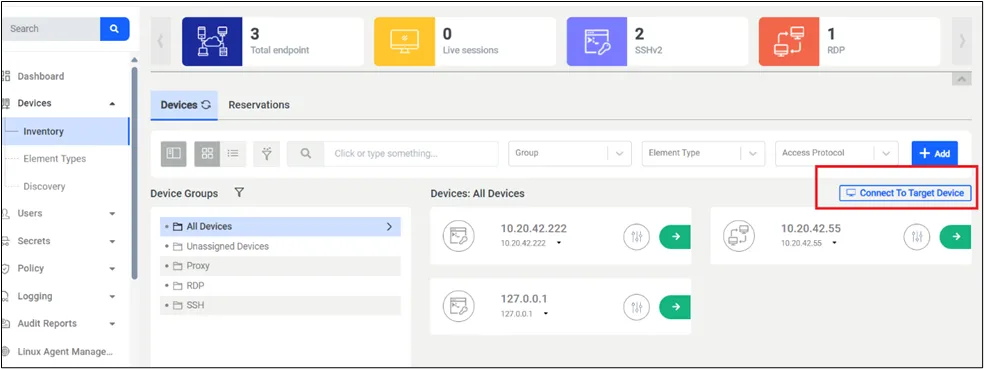
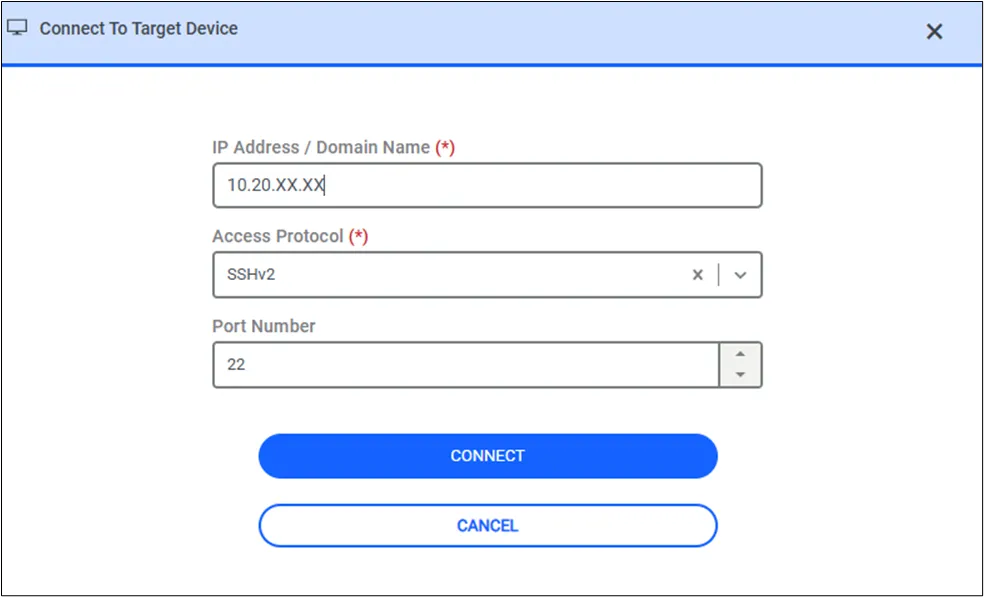
Connect to Target Device Screen