DSP Control Plane (CMS) Deployment
Deploy DSP-Core-UI to S3
This step involves building the DSP-core-ui application and deploying it to an S3 bucket for hosting as a website. Once the application is built, it is deployed to an S3 bucket that is configured to serve as a website.
Create a CloudFront Distribution
To create a CloudFront distribution, go to the CloudFront console in your AWS account and click "Create Distribution". Choose the "Web" distribution type and configure the it accordingly to the Figure 1 .
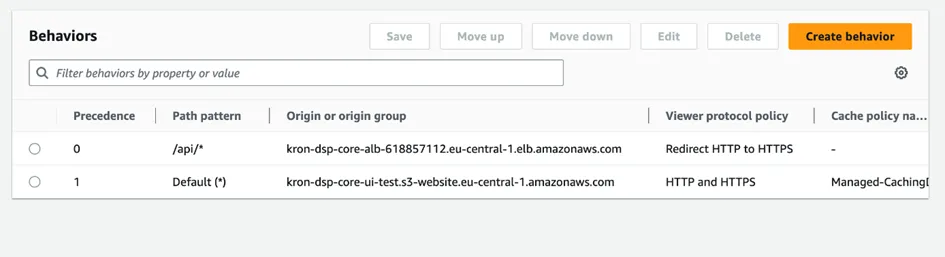
Postgres-14 Deployment on RDS
In this step, you will create an RDS (Relational Database Service) instance on Amazon Web Services with PostgreSQL version 14. After creating the RDS instance, you will create a schema named "aioc" in the database.
ALB Deployment on EC2
First, create two EC2 instances that will host your web applications. Make sure that your web applications are properly installed and configured on the instances.
Create a target group: Configure the target group settings as per your requirements, including the protocol and port that your web applications are listening on.
Register instances with the target group: After creating a target group, register the EC2 instances that are hosting your web applications with the target group.
Create an ALB: Choose "Application Load Balancer" as the load balancer type, and configure the settings for your ALB, including the VPC and subnets that you want to use.
Deploy EC2 Image
This Image will contain all backend services and tools that are required to manage Kron DSP's CMS.