Multi-Domain for AD Users
2 min
Every Active Directory user has a unique ID, and any configuration made for the user is bound with this unique ID. Therefore, Object GUID information from the LDAP has located in a column that the user accounts page.
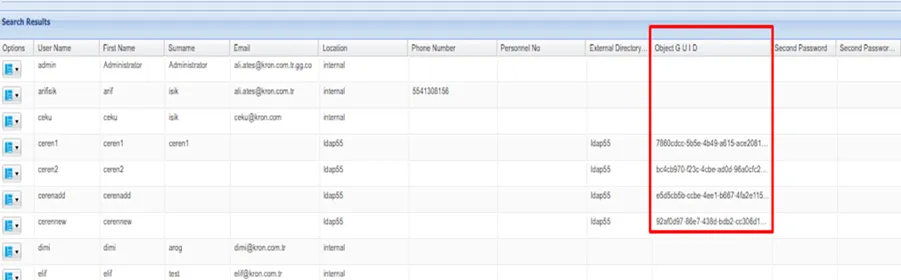
ObjectGUID attribute in User Accounts
When a username changes on the LDAP, it is also changed in Single Connect according to ObjectGUID. Therefore, Audit logs, Activity Logs, and Session Logs can be followed easily in case the username changes on the source. Username changes are available on the user group properties.
To see user information changes on the LDAP:
- Navigate to User Accounts > User Definition.
- Right-click on the AD user’s drop-down menu options button and select Show Properties.
- Click on the User History.
If more than one domain exists on Single Connect, users are able to select a domain on the WEB GUI page by configuration.
- Navigate to System Config Manager.
- Set the show.sc.portal.login.domain as true.
- Save this property.
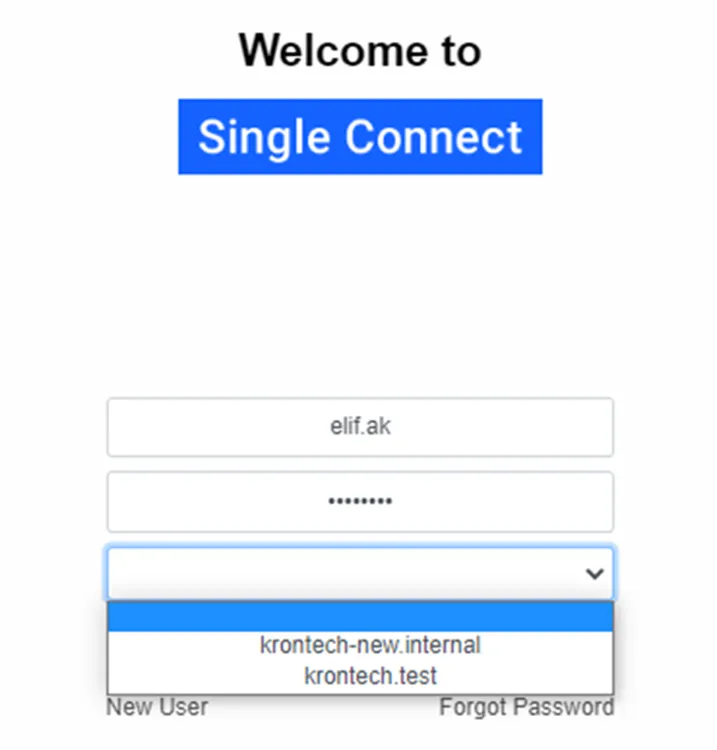
Select the domain for AD users