Email Notifications Configuration
2 min
In this tab, the existing alarm email notifications can be edited by clicking the notification name.
New notifications can be added using the Add button on the top right corner.
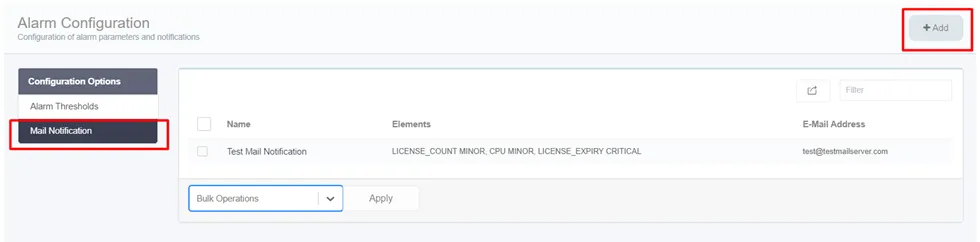
Email Notification Tab
An email notification profile can be created by filling up the following fields:
- Name: Name of the email notification profile.
- Type: Required monitored element type. Multiple selections are possible.
- Email address: The target email address. Multiple email addresses can be added.
- Email Subject: Subject of the email. By default the screen displays the following data:
Single Connect Alarm Notification %SEVERITY% - %MONITORED_ELEMENT% - %VALUE% - %INSTANCE_NAME% - %INSTANCE_IP% This email subject information can be edited by the user dynamically.
- Email introduction text: Body of the email. By default the screen displays the following data: Please check following alarm: Type: %MONITORED_ELEMENT% Severity: %SEVERITY% Value: %VALUE% Instance Name: %INSTANCE_NAME% Instance IP: %INSTANCE_IP%
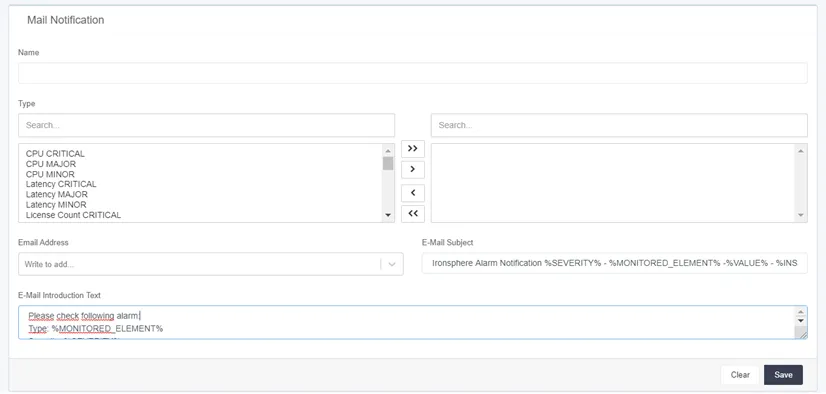
Email Notifications Configuration
The notification can be saved by clicking the Save button.