Adding Function Groups
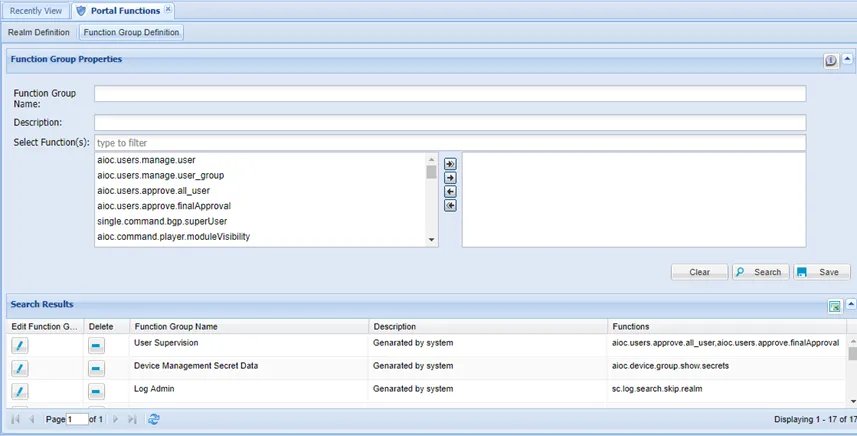
Single Connect’s user menu view and rights can be managed based on user groups. There are default portal function groups in Single Connect. The default groups can be used to give rights to users. New function groups can be created with the desired portal functions for different authorization purposes. To create a new function group:
- Navigate to Policy Control > Portal Functions.
- Open the Function Group Definition tab.
- Fill in the Function Group Name and Description fields.
- Select the rights and module views to be assigned to the users and click Save.
To edit a current function group:
- Navigate to Policy Control > Portal Functions.
- Open the Function Group Definition tab.
- Click the Edit Function Group button.
- Select the rights and module views to be assigned to the users and click Save.
Function | Description |
|---|---|
aioc.command.player.moduleVisibility | Grants rights to view the Quick Commands screen in the Utility menu. The Quick Commands section is used to run pre/post-check commands. |
aioc.cp.script.builder.ui.moduleVisibility | Grants rights to view the Script Builder screen in the Script Designer menu. The Script Builder is used to design new scripts and manage existing scripts. |
aioc.cp.script.player.ui.moduleVisibility | Grants rights to view the Script Player screen in the Script Designer menu. Users can run pre-defined scripts from the Script Player. |
aioc.cp.workflow.history.moduleVisibility | Grants rights to view the Workflow History screen in the Workflow Designer menu. When a defined workflow is run, its records are available in the Workflow History screen. |
aioc.cp.workflow.manager.moduleVisibility | Grants rights to view the Workflow Designer screen in the Workflow Designer menu. Workflows are created here. User groups require permissions to use a workflow. |
aioc.device.group.moduleVisibility | Grants rights to view the Device Groups screen in the Device Management menu. Device groups are created in this menu and device realms are created to determine the authorizations of user groups in the device groups. |
aioc.device.group.show.secrets | Grants rights to view the “Show Secrets” button in the Device Group Properties tab. Device group secrets can be viewed like passwords with this button. |
aioc.discovery.discover.device | Grants rights to access the tabs “New Device Discovery”, “Auto Device Discovery”, “Auto Discovery Log”, and “Auto Discovery Dashboard” under the Device Inventory section. |
aioc.discovery.manage.operationMode | Grants rights to schedule maintenance times for devices in the Device Inventory tab under the Device Management section. |
aioc.discovery.manage.unassigned | Grants rights to manage devices in unassigned device groups under the Device Inventory section. |
aioc.element.type.moduleVisibility | Grants rights to view the Element Type screen in the Device Management menu. This menu is used to create, delete, or edit devices manually. Properties of an element type are assigned here. |
aioc.help.manager.moduleVisibility | Grants rights to view the Help Manager screen in the Device Administration menu. This is used to create, edit, or delete the help menu content. |
aioc.platform.activity.logs.moduleVisibility | Grants rights to view the Activity Logs screen in the Logging menu. System events and all transactions made in the web interface are logged and these logs can be viewed from here. |
aioc.platform.sysconfig.moduleVisibility | Grants rights to view the System Config Management screen in the Administration menu. From here, if authorized, users can add, edit, or delete system configuration parameters. |
aioc.system.backup.moduleVisibility | Grants rights to view the Backup Management screen in the Device Administration menu. This section allows us to get backups after setting relevant parameters in the system configuration. |
aioc.users.approve.all_user | Grants rights to approve new user requests, even if not an admin. |
aioc.users.approve.finalApproval | Grants rights to approve pre-approved user requests. |
aioc.users.manage.user | Grants rights to manage users. |
aioc.users.manage.user_group | Grants rights to manage user groups. |
netright.admin.datasource.manager.moduleVisibility | Grants rights to view the Datasource Manager screen in the Administration menu. This section allows the definition of a datasource for Single Connect. |
netright.bulkimport.moduleVisibility | Grants rights to view the Bulk Import screen in the Administration menu. Devices can be added in bulk from this section. |
netright.commands.moduleVisibility | Grants rights to view the Command Template screen in the Utility menu. Defined commands that are used in scripts or pre/post-checks are managed from here. |
netright.components.moduleVisibility | Grants rights to view the Components screen in the Administration menu. |
netright.discovery.moduleVisibility | Grants rights to view the Device Inventory screen in the Device Management menu. This section enables adding, deleting, or editing devices. |
netright.jobs.moduleVisibility | Grants rights to view the Jobs Scheduler screen in the Administration menu. This section allows for managing manually triggered jobs. |
netright.log.moduleVisibility | Grants rights to view the System Log Viewer screen in the Administration menu. System logs can be monitored from this section. |
netright.mailSender.moduleVisibility | Grants rights to view the Mail Management screen in the Administration menu. You can send emails through Single Connect GUI from this section. |
netright.memory.moduleVisibility | Grants rights to view the Memory Manager screen in the Administration menu. You can check the memory status from this section. |
netright.realms.moduleVisibility | Grants rights to view the Portal Functions screen in the Policy Control menu. The authorization of user groups is determined in this section. |
netright.siem.configuration.moduleVisibility | Grants rights to view the SIEM Configuration screen in the SIEM menu. Single Connect can send logs to SIEM systems. After setting the necessary configurations in Sys. Config., the log type and the maximum record limit are set from this section. |
netright.user.approval.moduleVisibility | Grants rights to view the User Approval in the User Management menu. The User Approval section displays all users who have sent the “New User” request from the main page and is used to confirm their requests. |
netright.user.auth.log.moduleVisibility | Grants rights to view the User Authentication Logs screen in the Logging menu. From this screen you can access the log records of system activities involving logging in and out. The Authentication Logs page shows when and where users log in and what authentication method they are using. |
netright.users.moduleVisibility | Grants rights to view the User Accounts screen in the User Management menu. You can define users and user groups in this section. |
sc.aaa.remote.db.moduleVisibility | Grants rights to view the AAA Remote Database screen in the RADIUS menu. In this section, you can define and edit databases. |
sc.cloud.integration.moduleVisibility | Grants rights to view the Cloud Integration screen in the Administration menu. In this section, the required configurations to add or discover devices from Amazon Web Services can be set. |
sc.devops.moduleVisibility | Grants rights to view the DevOps Management screen in the DevOps menu. You can define new DevOps teams or edit existing ones in this section. |
sc.log.duplicator | This function provides the “duplicate log” option for logs in the Command Log tab in the Session Log section under the Logging menu. |
sc.log.search.network.admin | Grants rights to access the logs of device groups which are defined in a realm for the user. The user can view the logs of these device groups from the Command Log tab in the Session Log section, under the Logging menu. |
sc.log.search.skip.realm | Grants rights to view all logs of all devices in the Command Log tab in the Session Log section, under the Logging menu. Even if the device group realm is not defined, the users can still view logs with this function. |
sc.log.session.auditor | Grants rights to access the Audit Logs tab in the Session Log section, under the Logging menu. In this tab, Audit users can sign sessions as “passed audit”, “failed”, or “n/a”. |
sc.reservation.manager.request.on.behalf.of.group.users | Grants the right to the group manager to enter a connection reservation request on behalf of any group members. When granted, the “For User” selection field appears in the Connection Reservation screen for the group manager. |
sc.script.builder.super.user | Grants rights to access the Script Realm tab in the Script Builder section under the Script Designer menu. In this tab, you can authenticate user groups to play scripts. |
sc.secret.data.vault.admin | Grants rights to show, edit, and delete all defined secret data. |
sc.secret.data.vault.auditor | Grants rights to monitor secrets in the Secret Data Vault. |
sc.secret.data.vault.group.admin | Grants rights to see and manage data created by the same group user. |
sc.secret.data.vault.moduleVisibility | Grants rights to view the Secret Data Vault screen in the Secret Data Vault menu. The Secret Data Vault enables the storage of SSH keys, SSL keys, and other sensitive data. |
sc.sensitive.data.discovery.moduleVisibility | Grants rights to view the Sensitive Data Discovery screen in the Sensitive Data Discovery menu. This section is used to discover sensitive data in databases. |
sc.ssh.keys.provisioning.viewer | This function is defined for admins, to allow them to access the User Key Management tab, under the SSH Key Manager section, in the User Management menu. |
sc.tacacs.management.moduleVisibility | Grants rights to view the TACACS Management screen in the Administration menu. Single Connect uses its own TACACS+ server to authenticate users. TACACS+ configuration can be done from the TACACS+ Management section. |
single.connect.aapm.moduleVisibility | Grants rights to view the AAPM Management screen in the AAPM Management menu. You can add or remove accounts from the Application to Application Password Manager (AAPM) in this section. |
single.connect.assigned.credential.moduleVisibility | Grants rights to view the Assigned Credential screen in the User Management menu. When connecting to SSH/Telnet or RDP devices through the Single Connect Proxy, the assigned credentials should be used. You can determine the users and credential source from this section. |
single.connect.cli.moduleVisibility | Grants rights to establish an SSH/Telnet connection by clicking the “Open Terminal” option for devices. The “Open Terminal” option is presented in the Device Inventory section under the Device Management menu. |
single.connect.dashboard.moduleVisibility | Grants rights to view the Statistic screen in the Dashboard menu. The activities and commands ran by users are viewed in this section. |
single.connect.diagnostic.moduleVisibility | Grants rights to view the Policy Tracking screen in the Policy Control menu. You can search the user’s authentication and authorization details and SAPM accounts’ permissions in this section. |
single.connect.freeradius.802dot1x.moduleVisibility | Grants rights to view the RADIUS 802.1x Configurations screen in the Administration menu. Single Connect can be used as an 802.1x authentication server. Users can access their WiFi with their username and password after making the required configurations. |
single.connect.freeradius.acc.moduleVisibility | Grants rights to view the RADIUS Account Logs screen in the Logging menu. This section displays RADIUS account logs. |
single.connect.httpProxy.ui.moduleVisibility | Grants rights to view the HTTP Proxy Logs screen in the Logging menu. You can view transactions of HTTP Proxy sessions in this section. |
single.connect.instanceController.moduleVisibility | Grants rights to access the Single Connect Controller Configuration section. You can configure all instances by using this section. |
single.connect.linux.audit.report.moduleVisibility | Grants rights to view the Linux Audit Report screen in the Audit Report menu. This section is used to report the current security status of local Linux accounts. |
single.connect.macfiltering.moduleVisibility | Grants rights to view the MAC Filtering screen in the Administration menu. This section is used to manage the user’s MAC addresses. User’s MAC addresses can be defined, edited or deleted. |
single.connect.policy.enforcement.moduleVisibility | Grants rights to view the Session Policy screen in the Policy Control section. The system policies are created and edited by using the Policy Control section. You can manage the “Policy Key”, “Time Restriction”, “Policy Group”, “Policy Realm”, “Permit Zone”, “HTTP Policy”, and “User Location” tabs from this section. |
single.connect.rdp.client.moduleVisibility | Grants rights to establish a Remote Desktop session by clicking the “Open Remote Desktop” option for devices. The “Open Remote Desktop” option is presented in the Device Inventory section, under the Device Management menu. |
single.connect.rdp.disallow.hiding.keys | This function is used to disable the key log hiding feature for certain user groups. |
single.connect.remote.desktop.app.moduleVisibility | Grants rights to view the Remote Desktop App screen in the Administration menu. Single Connect allows you to limit the applications to be accessed on windows servers from this section. After the application name and path are defined in this section, permissions are set from the Device Management menu. |
single.connect.remote.desktop.moduleVisibility | This function grants rights to play sessions in the Command Logs tab in the Session Log section, under the Logging menu. |
single.connect.reports.ui.moduleVisibility | Grants rights to view the Reports screen in the Dashboard menu. This section has the “Authentication Reports”, “Session Reports”, “Session Details Report”, and the “Group Management Reports” tabs to view reports. |
single.connect.reservation.management.moduleVisibility | Grants rights to view the Reservation Management screen in the Policy Control menu. Users can make connection reservations for devices that require managerial approval for connection from this section. After the approval from a manager, users can connect to the system in the specified time during reservation. |
single.connect.sapm.admin | This function makes the user an admin. Admins have rights to manage all SAPM accounts and view all logs. |
single.connect.sapm.approval.requirement | This function restricts users from viewing passwords without approval. When a user wants to retrieve the SAPM password, an approval email is sent to the admin. After approval by the admin, the user can view the password. |
single.connect.sapm.auditor | This function grants rights to list all SAPM accounts, without seeing details. |
single.connect.sapm.configuration.admin | Grant rights to access the Configuration section in the SAPM Management menu. SAPM configurations can be edited in this section. |
single.connect.sapm.historical.password.viewer | Grants rights to view the old passwords of SAPM accounts. |
single.connect.sapm.log.viewer | Grants rights to see the “Password Change”, “New Users”, and “Password Check” logs in the SAPM page. |
single.connect.sapm.moduleVisibility | Grants rights to view the SAPM Management menu. |
single.connect.sapm.network.admin | Grants rights to manage and view all the device accounts associated with a user. |
single.connect.sapm.network.auditor | Grants rights to list all device accounts defined in user device group realms, without seeing the details. |
single.connect.sapm.secondlevel.admin | Grants rights to give second level approval for all SAPM accounts and view all logs. |
single.connect.secondlevel.approval.requirement | This function restricts viewing the password without a two-level approval. |
single.connect.sapm.secondlevel.network.admin | Grants rights to give second level approval for all device accounts defined in user device group realms. |
single.connect.session.active.logs.moduleVisibility | Grants rights to view the Active Sessions screens in the Policy Control menu. Administrators can manage active proxy sessions, such as wiring to the session or killing the session. |
single.connect.sessionmanager.ui.moduleVsibility | Grant rights to view the Session Manager screen in the Administration menu. User activities can be viewed in this section. |
single.connect.setup.wizard.moduleVisibility | Grants rights to view the Single Connect Setup Wizard screen in the Setup Wizard menu. |
single.connect.sql.proxy.moduleVisibility | Grants rights to view the SQL Proxy Policy screen in the Policy Control menu. The dynamic masking policy and masking methods are defined and managed in this section. |
single.connect.sshkeys.moduleVisibility | Grants rights to view the SSH Keys Manager screen in the User Management menu. SSH keys can be generated and managed in this section and used for logging in to the Single Connect proxy instead of the user’s password. |
single.connect.tacacs.acc.moduleVisibility | Grants rights to view the TACACS Account Logs screen in the Logging menu. All commands executed during the TACACS+ session can be viewed in the TACACS Account Logs menu. |
single.connect.tenant.admin | Single Connect’s multi-tenancy function can provide multiple and independent applications and functions. It enables an architecture in which a single instance serves multiple customers. Each customer is called a tenant. Tenants may be given the ability to customize some parts of the application. This function works if the “multitenancy.enabled” parameter is set as “true” on the System Configuration Management. Tenant admins can only manage devices and users that they are allowed to access, and can only see the logs related to the devices and users they have access to. |
single.connect.twofactor.hardwareToken.management | Grants rights to access the Hardware Token Management, and the Hardware Token Bulk Import tabs under the 2FA Provisioning section. |
single.connect.twofactor.acc.moduleVisibility | Grants rights to view the Two-Factor Provisioning section in the Administration menu. Single Connect provides a Two-Factor Authorization by mobile application or SMS verification. |
single.connect.twofactor.assign.hardware.token | This function provides the right to assign hardware tokens in the 2FA Provisioning section. |
single.connect.twofactor.barcode.viewer | Grants rights to see the Token’s QR Code or written code in the 2FA Provisioning section. |
single.connect.user.logs.moduleVisibility | Grants rights to view the Session Log screen in the Logging section. |
single.connect.warp.configuration.viewer | Grants rights to access the Report Configuration tab in the Windows Audit Report section. In this tab, you can create a report configuration to check the security of Windows accounts. |
single.connect.warp.dashboard.viewer | Grants rights to access the Dashboard tab in the Windows Audit Report section. In this tab, you can view the reports as graphs. |
single.connect.warp.report.viewer | Grants rights to access the Report tab in the Windows Audit Report section. In this tab, you can search for reports and view them with their details. |
single.connect.windows.audit.report.moduleVisibility | Grants rights to view the Windows Audit Report screen in the Audit Report section. The Windows Audit Report is used to report the current security status of local Windows accounts. |
tfaProvisioningViewer | Grants rights to see the “User Token Management”, and the “User Group Management” tabs in the 2FA Provisioning section under the Administration menu. You can manage user and user group tokens and OTPs (One-Time Password) for user groups. |