Creating Datasources
1 min
The database to be searched for sensitive data must be defined in Single Connect with its credentials, to get the schema, table, and column names.
- Navigate to Administration > Datasource Manager.
- Enter the Datasource name, description, connection URL, username, password, and Max. Thread Count for Sensitive Data Discovery. (optional)
- Click the Test Connection button to test.
- Click the Save button to save the connection information.
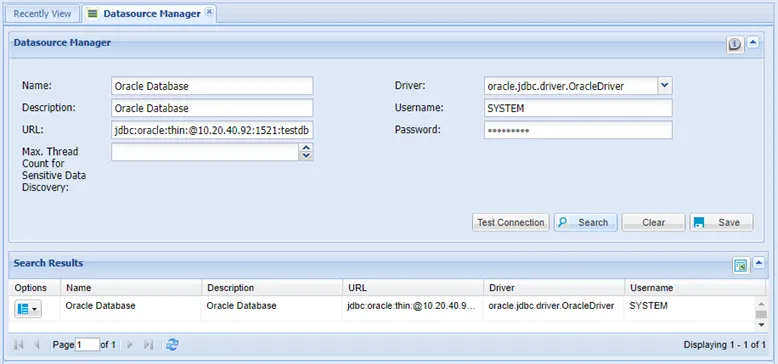
Creating a Datasource
Max. Thread Count for Data Discovery: Defines the maximum number of parallel connection threads that can be opened on this database when using the sensitive data discovery feature. If it is not defined in the datasource definition, the sdd.max.thread.count parameter value defined in the system config manager is valid as the maximum value. The sdd.max.thread.count default value is 500.
URL: The URL formats for database types should be:
- MYSQL jdbc:mysql://ipaddress:port/dbname Ex: jdbc:mysql://10.20.30.40:3306/testdb
- CASSANDRA jdbc:cassandra://ipaddress:port/dbname Ex: jdbc:cassandra://10.20.30.40:9160/testdb
- ORACLE jdbc:oracle:thin:@//ipaddress:port/dbname Ex: jdbc:oracle:thin:@//10.20.30.40:1521/testdb
- MSSQL jdbc:sqlserver://ipaddress:port;databaseName=dbname Ex: jdbc:sqlserver://10.20.30.40:1433;databaseName=testdb
- TERADATA jdbc:teradata://ipaddress/database=dbname jdbc:teradata://10.20.30.40/database=testdb
- POSTGRESQL jdbc:postgresql://ipaddress:port/dbname jdbc:postgresql://10.20.30.40:5432/testdb
- HIVE jdbc:hive2://ipaddress:port jdbc:hive2://10.20.30.40:10000
- DB2 jdbc:db2://ipaddress:port/dbname jdbc:db2://10.20.30.40:50000/TESTDB