3.4.3 Connecting Single Connect SQL Proxy
Connecting Oracle Database via Single Connect SQL Proxy
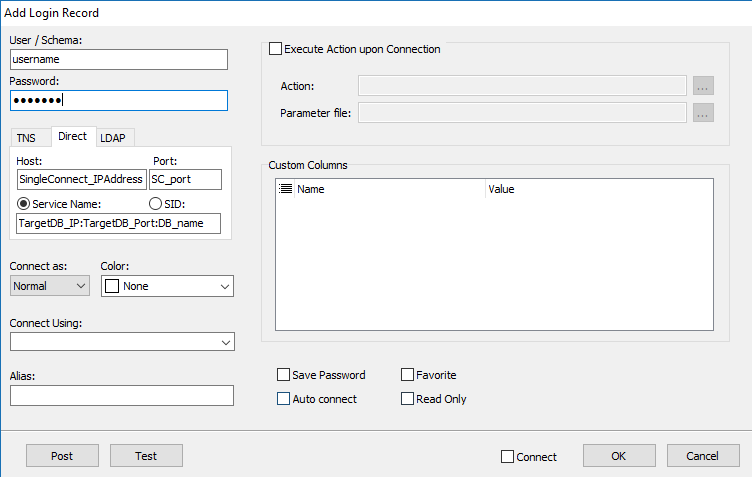
1. Create new connection on the SQL Client 2. Enter username and password of the database 3. Set the Single Connect IP address and port as the connection host and port address. 4. Enter the target database IP address, port and database name into the service name field. Values should be separated by the colon ":" punctuation
Connecting MSSQL, Cassandra and MySQL Database via Single Connect SQL Proxy
The port number is the identifier of the connection to the Database via the SQL Proxy feature of Single
Connect.
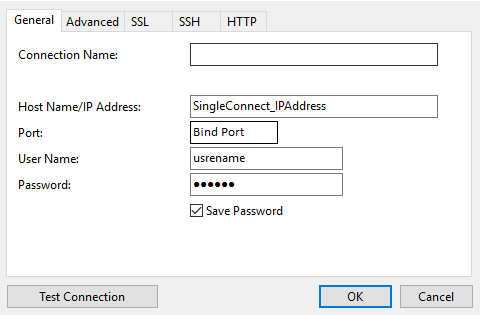
1. Create new connection on SQL Client 2. Enter in the username and password of the database 3. Set the Single Connect IP address as the connection host and IP address 4. Enter the “Bind Port” number defined by “sql.proxy.bind.port” in Device Properties of the related device.
Note |
|---|
Single Connect supports Domain Authentication by including Single Connect and User's PC to the Domain. Later this process, "Windows Authentication" option will be ready to use. |