3.2 SSH/TELNET Proxy
SSH/TELNET Proxy
The Single Connect SSH/TELNET Proxy feature can be used to log and monitor SSH/TELNET sessions. Managing devices and Policy Management rules are used for SSH/TELNET proxies.
Users can establish SSH connection with multiple options which are described below:
With a global user:
When a Single Connect user with privileged access (like root or admin) connects to devices , they can connect to those devices without knowing the privileged user password. The Global Username should be defined to use this feature. Settings can be found from Managing devices.
There are 4 ways to connect to a device with a global username:
- Global Password: Set
- SAPM Password: If there is an SAPM account defined for the global user and the device that user wants to connect to.
- Global SSH Key: Set
- Rotating SSH Key: If there is an SAPM account with SSH-Key strategy for the global user and the device that user wants to connect to.
When connecting to a device with a global username via an SC proxy, the priority rules applied are below:
- If there is a defined SAPM account, the SAPM password or rotated SSH Key is used for authentication of the GlobalUser as first priority.
- If the SAPM account is not defined, the global SSH Key is used to connect the device as second priority
- If these two options are not defined in the device properties, the global password is used for the connection to the device. Global password has the least priority.
- If the device requests both SSH Key and password for authentication, both the SSH Key and password are used for authentication. In this case, the SAPM account password is used as first priority and the globalPassword is used as second priority.
With local or LDAP user:
If the Global Username is not defined in the device properties, Single Connect user can connect to devices that have access with Single Connect credentials.
Note |
|---|
To ensure this connection type with local or LDAP users, Single Connect users’ credentials should be defined in the target devices. |
Device Group Properties for SSH/TELNET Proxy:
Property Key | For SSH/TELNET | Definition |
|---|---|---|
addManualLoginToUserSelection | SSH/TELNET | This property only applies to SSH/TELNET Proxies in Session Manager Modules. Default value is “false”. When the value is set as “true”, the user can enter the device username and password manually. |
addSessionUserToUserSelection | SSH/TELNET | This property only applies to SSH/TELNET Proxies and RDP/VNC Proxies in Session Manager Modules. When the “addSessionUserToUserSelection” property is set as “true” on a device group, users can connect to target devices in the device group with their own username which they use to log in to Single Connect. |
approvalRequiredForConnection | SSH/TELNET | This property only applies to SSH Proxies and RDP Proxies in Session Manager Modules. When its value set as “true”, managerial approval via e-mail is requested for users to connect to devices in the device group. |
globalUsername | SSH/TELNET | The username to use when connecting to all devices covered by the device group. This username must be pre-defined as a user on all devices in the device group. |
globalPassword | SSH/TELNET | It is the password of the “globalUsername” The password to use when connecting to all devices covered by the device group. |
globalSshKey | SSH | This property only applies to SSH Proxies in Session Manager Modules. If connecting to devices with an SSH Key is preferred, “globalSshKey” should be defined for the Device Group. |
globalSshKeyPassphrase | SSH | This property only applies to SSH Proxies in Session Manager Modules. If the device to be connected has an SSH passphrase, “globalSshKeyPassphrase” should be defined for theDevice Group. |
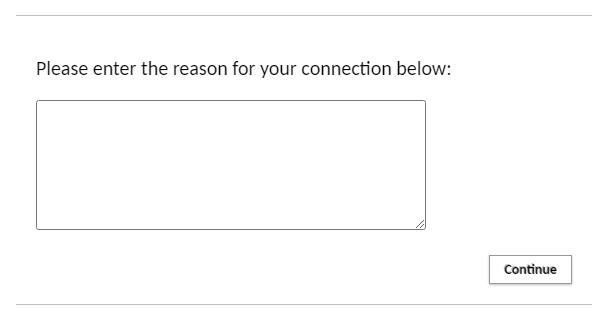
reasonRequiredForConnection | SSH | This property only applies to SSH Proxy and RDP Proxy in Session Manager Modules. When its value is set as “true”, a comment/reason field appears when users try to connect the devices in the device group. The text entered here will appear in the session logs and managerial approval emails and notifications (if enabled). |
sessionDurationLimitMinute | RDP/SSH | The property only applies to SSH Proxies and RDP Proxies in Session Manager Modules. User's sessions can be limited based on the session duration. |
When the “addSessionUserToUserSelection”, “addManualLoginToUserSelection” and “GlobalUsername” properties are defined for a Device group, the connection options are listed below:
addSessionUserToUserSelection | addManualLoginToUserSelection | Global User Count | Behavior |
|---|---|---|---|
False | False | 0 | Connect with session user automatically |
False | false | 1 | Connect with global user automatically |
False | false | More than 1 | List global users |
False | true | 0 | Ask username/password |
False | true | 1 | List "Manual Login" option and global user |
False | true | More than 1 | List "Manual Login" option and global users |
True | false | 0 | Connect with session user automatically |
True | false | 1 | List "Session User" option and global user |
True | false | More than 1 | List "Session User" option and global users |
True | true | 0 | List "Session User" option and "Manual Login" option |
True | true | 1 | List "Session User" option, "Manual Login" option and global user |
True | true | More than 1 | List "Session User" option, "Manual Login" option and global users |
Dual Authentication for Single Connect SSH/TELNET Proxy
Please ask consultation from Kron Technical Support [email protected]
SSH Sessions Duration Based Limitation Settings
Please ask consultation from Kron Technical Support [email protected]
Connection to Single Connect SSH Proxy
Users can use their own SSH clients to connect to Single Connect SSH/Telnet Proxies. To connect to a Single Connect SSH/Telnet Proxy, type the Single connect IP address as the host IP address and 2222 as the connection port. (2222 is default SSH/Telnet Proxy Port. Port number can be changed by system the administrator.)

Assigned Credentials
When connecting to SSH/Telnet supported devices through a Single Connect SSH/Telnet Proxy, the following credentials can be used for logging in to the remote device:
- Global Username and Global Password or SSH Key (static values)
- Global Username as an SAPM account, with changed password
- User’s own credentials, if they are allowed to log in to the remote device
- Different assigned credentials for each user, like john.local account for the user John, julia.local account for the user Julia, etc.
For the fourth option, Assigned Credentials should be used. The following steps should be followed:
- Log in to the Single Connect Web GUI as an admin user.
- Navigate to Device Management > Device Groups
- Right-click a Device Group and select Show Properties. (This device group should be put in a device group realm with the user group including users, beforehand)
- Save the “addAssignedCredentialToUserSelection” property as “true”
These steps enable the Assigned Credential usage for a device group. To set up the assigned credentials for different users, first SAPM or Secret Data Vault accounts should be saved. (“SAPM” is used for passwords that are being rotated by the Password Manager, while “Secret Data Vault” can be used for static usernames and passwords or SSH Keys) After that, these steps should be followed:
- Log in to the Single Connect Web GUI as an admin user
- Navigate to User Management > Assigned Credential section.
- Start typing username in “User” text box, matching users will appear just below. Select the one for whom another credential will be assigned.
- Select “SAPM” or “Secret Data Vault” as the Credential Source. (“SAPM” is used for passwords that are being rotated by Password Manager, while “Secret Data Vault” can be used for static usernames and passwords)
- According to the selection either select the “SAPM Username” or “Secret Data Vault” name.
- Save
After these steps are completed, assigned credentials will be used for the connection when these Single Connect users that are defined in these steps are trying to open an SSH/Telnet session.


Domain User Credentials
While connecting to the SSH/Telnet supported devices through a Single Connect SSH/Telnet Proxy, user’s own credentials which used to login Single Connect can be used for logging in to remote devices. If the “addSessionUserToUserSelection” property key is set as “true” in device group properties, session user will be prompted in user selection screen while connecting to target device. But some of the remote devices require FQDN addresses in addition to a username. In this case the “useEmailAsUsername” property key should be set as “true” in device group properties to use username and FQDN name together to log in to target devices.

SSH Proxy Encryption and Key Exchange Algorithms
Please ask consultation from Kron Technical Support [email protected]
Reason Field for Device Connections
A mandatory reason field can be enabled to be filled by users when connecting to devices. This text entered here would appear in Session Logs and the managerial approval emails and notifications. To enable this feature, the “reasonRequiredForConnection” property must be set as “true” on a device group that includes the target devices.
Managerial Approval for User connecting to device
To enable managerial approval via e-mail for users connecting to devices, the “approvalRequiredForConnection” property must be set as “true” on a device group that has the target devices.
