2.16 SAML Authentication
SAML is a protocol to share security credentials across one or more networked systems. SAML Authentication integration can be used to integrate external identity providers with Single Connect.
Single Connect can be integrated with OneLogin identity provider.
Configurations on OneLogin
1. Create an SAML Connector (IdP W/Attr) for Single Connect 2. Navigate to the “Configuration” tab of the created Single Connect App 3. Fill the following parameters related to Single Connect
Audience: singleconnecthost/samlCheck
Ex: https://10.20.30.40/login-ui/samlCheck
Recipient: URL: singleconnecthost/samlRecipient
Ex: https://10.20.30.40/login-ui/samlRecipient
ACS (Consumer) URL Validator: Set “.*” regular expression
ACS (Consumer) URL: Same as Recipient
Ex: https://10.20.30.40/login-ui/samlRecipient
Single Logout URL: URL: singleconnecthost/samlLogout Ex: https://10.20.30.40/login-ui/samlLogout
Note: E-mail (SAML NameID) should be the same as the Single Connect username.
Configurations on Single Connect
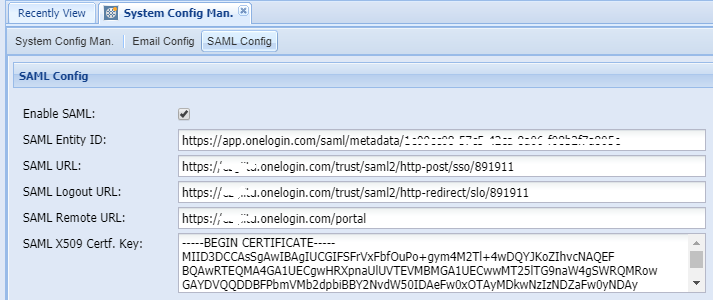
1. Log in to the Single Connect Web GUI 2. Navigate to Administration > System Config. Man. > SAML Config 3. Fill in the following parameters related to OneLogin
Parameter Name | Description |
|---|---|
Enable SAML | It must be enabled to use SAML authentication |
SAML Entity ID | Issuer URL of SAML Test Connector at OneLogin Portal. Administrator>>Managed tabs>>Single Connect Saml Connector>>SSO tab |
SAML URL | SAML 2.0 Endpoint (HTTP) URL of SAML Connector at OneLogin Portal Administrator>>Managed tabs>>Single Connect Saml Connector>>SSO tab |
SAML Logout URL | SLO Endpoint (HTTP) URL of SAML Connector at OneLogin Portal Administrator>>Managed tabs>>Single Connect Saml Connector>>SSO tab |
SAML Remote URL | Personal Portal URL |
SAML X509 Cert. Key | X.509 Certificate of SAML Connector at OneLogin Portal. Administrator>>Managed tabs>>Single Connect Saml Connector>>SSO tab |