2.15 802.1x Authentication
802.1x Authentication
This configuration have two phases and first phase of the configuration requires higher level of modification. Please ask consultation from Kron Technical Support for these steps [email protected]
Single Connect GUI Configurations
Single Connect admins should follow the steps below:
- Log in to the Single Connect Web GUI
- Create user and user group. (See also:
- Create device group and add new device to device group. (See also:
- Create Device Group Realm with the user group and device group defined at step 2 (see NOTE)
- Define the authenticator secret key as
- Navigate to Administration> Radius 802.1x Config.
- Choose an EAP Type (only PEAP is available for now as EAP type)
- Fill in the “Certificate Authority PEM”, “Certificate Private Key PEM” (which has certificate and private key) and “Certificate Private Key Password” fields.
Note |
|---|
The device that is added at step 3 must be the last destination IP that sends an authentication request to Single Connect. For example, Wireless LAN Controller, Firewall etc. |

1. If Dynamic VLAN and MAC filtering are to be activated, the check-box should be selected. (See also: MAC Filtering Configuration)
Note |
|---|
VLANs can be dynamically assigned by a RADIUS server to supplicants requesting 802.1X authentication through that server. If dynamic VLAN is assigned to supplicants, the following 2 settings must be set in Single Connect: |
1.Choose dynamic VLAN check box in the 802.1x config screen 2. RADIUS Attribute Policy should be defined on related user group as VLAN interval. See also: “Adding RADIUS/TACACS+ Attribute” at TACACSthe TACACS Access Manager section in the Admin Guide. |
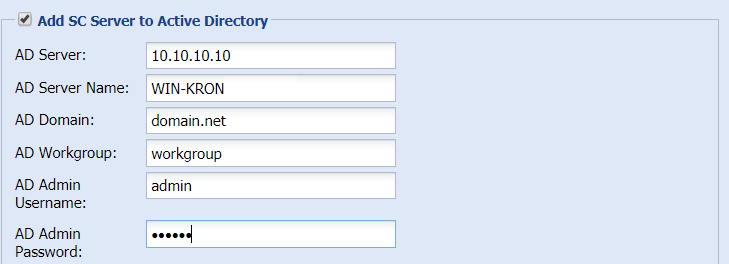
2. Select the “Add SC Server to Active Directory” option and fill the necessary fields
MAC Filtering Configurations
If MAC addresses are defined for a user, that user can use only those MAC addresses. The same MAC address can be defined to different users. Users cannot use undefined MAC addresses for RADIUS authentication. To activate Mac filtering while using 802.1x Authentication, follow the steps below:
- The "MAC Filtering" option in the "Administration / Radius 802.1x Config" screen must be selected

- Allowed Mac Addresses must be defined
- Log in to the Single Connect Web GUI
- Navigate to Administration > MAC Filtering
- Enter user MAC Address and username
- Save
