Single Connect GUI Configuration
Configurations in the Single Connect GUI are required as well:
- Create device groups and add new devices to device groups. (See sections Creating Device Group Realms and Adding Devices Manually)
- Create device group realms with the user groups and device groups defined in the previous steps (See section Creating Device Group Realms)
The devices added in step 2 must correspond to the last destination IP that sends an authentication request to Single Connect. For example, Wireless LAN Controller, Firewall etc.
- Define the authenticator secret key as globalSecretKey on the device group properties. (See section Device Groups Properties )
- Navigate to Administration> RADIUS 802.1x Config.
- Choose an EAP Type (only PEAP is currently available)
- Fill in the fields “Certificate Authority PEM”, “Certificate Private Key PEM” (which includes certificate and private key), and “Certificate Private Key Password”.
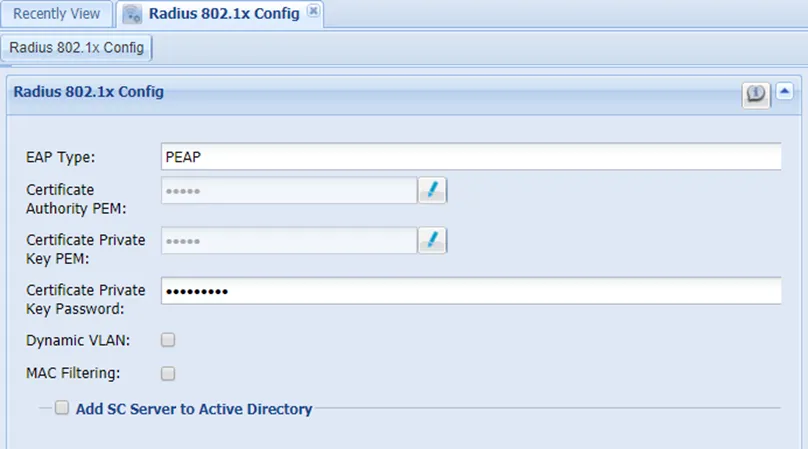
802.1x Configuration
- If Dynamic VLAN and MAC filtering are to be activated, the box(es) should be checked. (See section MAC Filtering Configuration) VLANs can be dynamically assigned by a RADIUS server to applicants requesting 802.1X authentication through that server. If dynamic VLAN is assigned to applicants, the following 2 settings must be set in Single Connect:
- Check the dynamic VLAN box in the 802.1x config screen
- The RADIUS Attribute Policy should be defined on the related user group as VLAN interval. See section Adding RADIUS/TACACS+ Attributes.
- Check the Add Single Connect Server to Active Directory box and fill in the required fields:
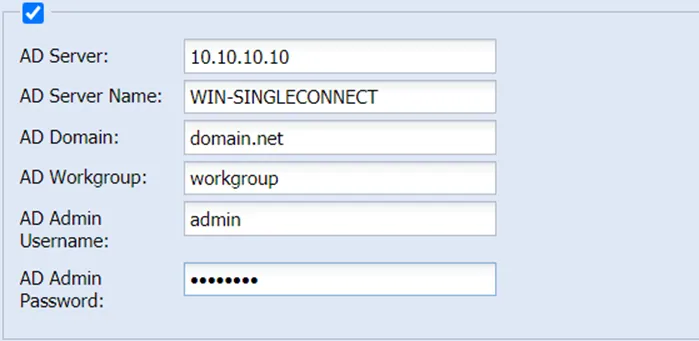
802.1x Active Directory Configuration