SAML Authentication
SAML is a protocol used to share security credentials across one or more network systems. SAML Authentication integration can be used to integrate external identity providers with Single Connect.
Single Connect can be integrated with OneLogin identity provider.
OneLogin Configuration
Configurations required in OneLogin:
- Create an SAML Connector (IdP W/Attr) for Single Connect.
- Navigate to the Configuration tab of the created Single Connect App.
- Fill in the following parameters related to Single Connect:
Audience: singleconnecthost/samlCheck Ex: https://10.20.30.40/login-ui/samlCheck Recipient: URL: singleconnecthost/samlRecipient Ex: https://10.20.30.40/login-ui/samlRecipient ACS (Consumer) URL Validator: Set “.*” regular expression ACS (Consumer) URL: Same as Recipient Ex: https://10.20.30.40/login-ui/samlRecipient Single Logout URL: URL: singleconnecthost/samlLogout Ex: https://10.20.30.40/login-ui/samlLogout
The Email (SAML NameID) should be the same as the Single Connect username.
Single Connect Configuration
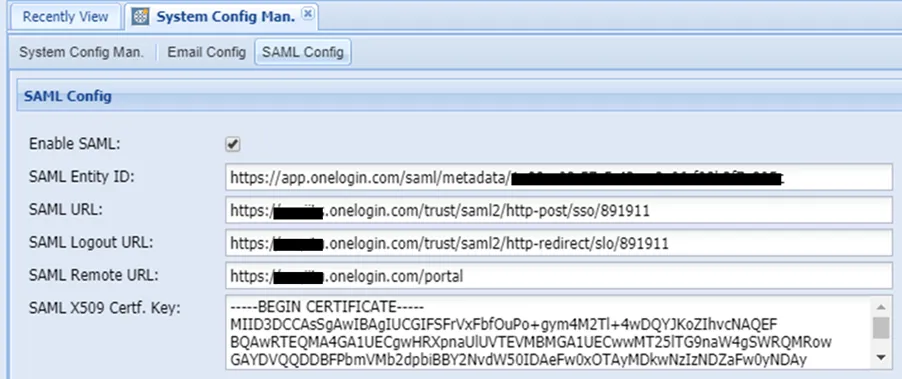
Following the OneLogin configuration, additional configurations need to be set in Single Connect:
- Navigate to Administration > System Config. Man.
- Open the SAML Config tab.
- Fill in the following parameters related to OneLogin:
Enable SAML | It must be enabled to use SAML authentication. |
|---|---|
SAML Entity ID | SAML Test Connector Issuer URL from the OneLogin Portal. Administrator > Managed tabs > Single Connect Saml Connector > SSO tab. |
SAML Logout URL | SAML Connector SLO Endpoint (HTTP) URL from the OneLogin Portal Administrator > Managed tabs > Single Connect Saml Connector > SSO tab. |
SAML Remote URL | Personal Portal URL |
SAML URL | SAML Connector SAML 2.0 Endpoint (HTTP) URL from the OneLogin Portal Administrator > Managed tabs > Single Connect Saml Connector > SSO tab |
SAML X509 Cert. Key | SAML Connector X.509 Certificate from the OneLogin Portal. Administrator > Managed tabs > Single Connect Saml Connector > SSO tab |