Importing Unknown Domains as Bypass Domains
Once a browser is setup with an HTTP proxy configuration, and a user tries to visit websites that are not included in the http.bypass.domain parameter in any Element Types, they will be rejected by the HTTP Proxy. To add these domains as bypass domains:
- Navigate to Logging > HTTP Proxy Logs.
- Open the Unknown Domains tab
- Search for unknown domains.
- Results will be listed in the HTTP Proxy Unknown Domains table.
- Select the domains to be transferred as bypass domains.
- Click Add to Bypass Domain.
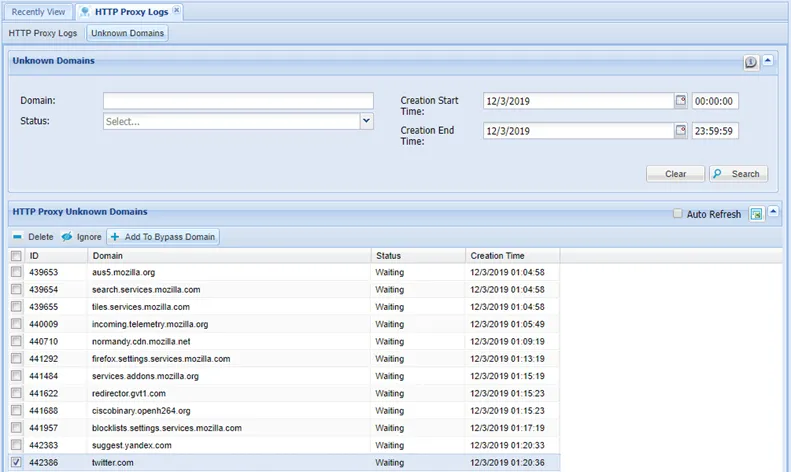
Adding unknown domains as bypass domains
- Edit the Domains field (adding “*.” at the beginning of the domain is a good idea, since many bypass domains are specialized for the main domain and respond when a request is sent to the main domain), select the Element type, and click the Add to Bypass Domain button.
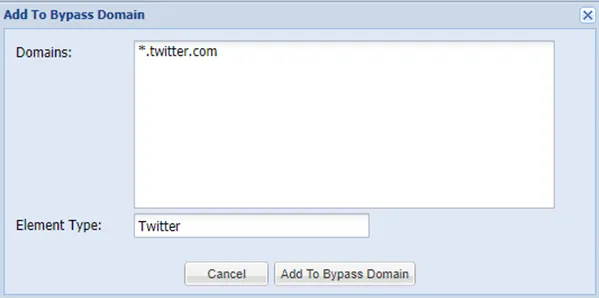
Add to bypass domain dialog box
- Open an SSH connection to the Single Connect Server.
- Restart the HTTP Proxy by running the command: systemctl restart http_prox
Try going to the webpage again, and this time you will be able to connect.