Creating AWS Device Import Jobs
Importing AWS Instances requires a Single Connect Job for synchronization. The job will update the information on Single Connect periodically depending on the cron expression.
- Navigate to Administration > Jobs Scheduler.
- Open the Trigger List tab
- Select AwsDeviceImportJob as the Job.
- Fill in the Trigger Name and Cron Expression fields.
- To enable the job, select Enabled for the Active field, and click Save.
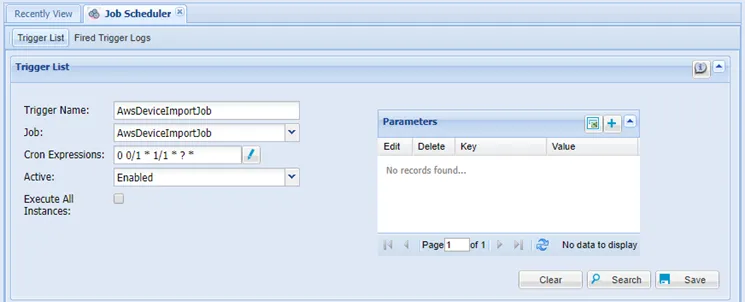
AWS Device Import Job
To trigger the job manually, after the job has been created:
- Navigate to Device Administration > Jobs Scheduler.
- Open the Trigger List tab.
- Click the Trigger Now button on the AwsDeviceImportJob.
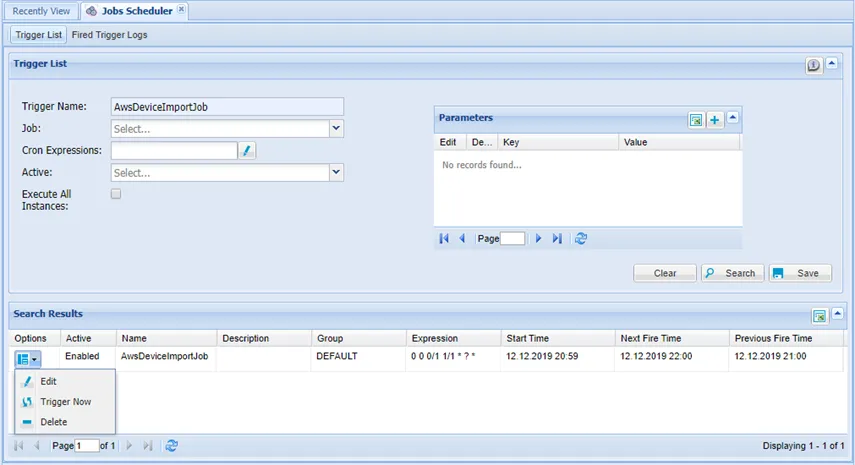
Trigger AWS Device Import Job Manually