Connecting to an Oracle Database via Single Connect SQL Proxy
To connect to an Oracle database:
- Create a new connection on the SQL Client (Toad, Navicat, etc.)
- Enter the database username and password.
- Set the Single Connect IP address and port as the connection host and port address.
- Enter the target database IP address, target database port, and database name in the Service Name field. Values should be separated with a colon ":"
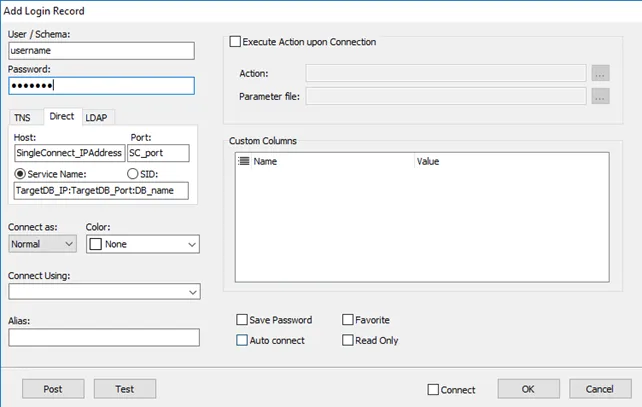
Connecting with SQL Proxy
Single Connect supports the proxy user authentication feature of Oracle DBs. The connection string for proxy user authentication is proxy_user[authorized_user]. The password for this connection should be the password of the proxy user.