Using the SQL Menu
Use the SQL menu to work with SQL queries in Superset.
To open the menu: Click SQL on the top menu.
The options on the SQL menu.
Option | Description |
|---|---|
SQL Lab | Opens SQL Lab. For details, see Using SQL Lab. |
Saved Queries | Lists the saved queries. Open a saved query in SQL Lab. |
Query History | Lists the previously run queries. Open a query from the history in SQL Lab. |
Using SQL Lab
Use SQL Lab to write and run SQL queries, and to save a query as a dataset.
To run a query:
1. Navigate to SQL > SQL Lab.
2. In the Database field, select a database.
3. In the Schema field, select a schema.
4. Type the query in the editor.
5. Click Run. The results appear on the Results tab. The results options are:
Option | Description |
|---|---|
Create Chart | Opens the chart editor with the query results. For details, see Configuring a New Chart. |
Download to CSV | Downloads the query results to a .CSV file. |
Copy to Clipboard | Copies the query results to the clipboard. |
Filter results | Filters the rows in the results by the text that you type. |
The timer next to the Limit field shows the response time of the query.
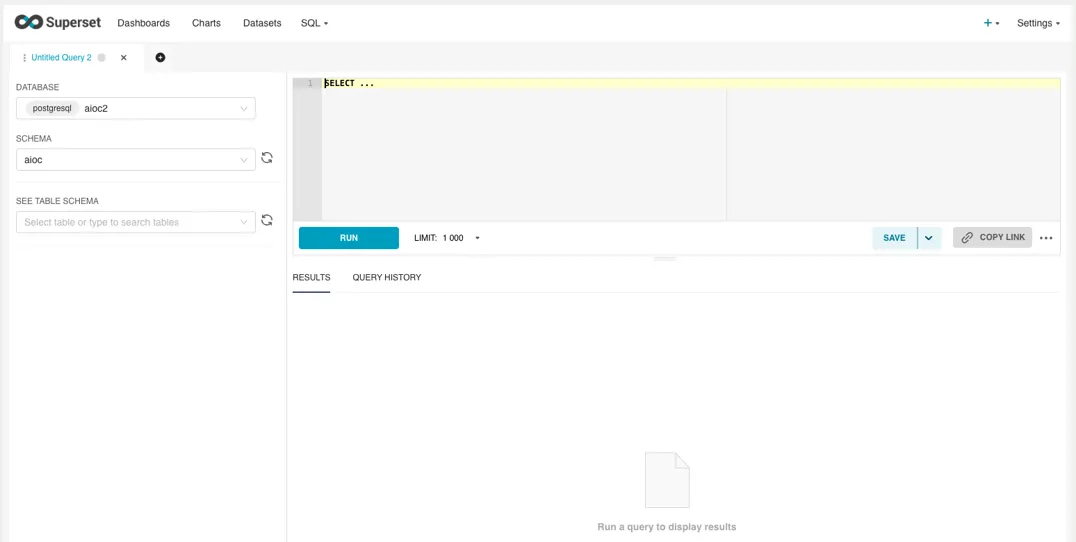
The elements on the SQL Lab screen.
Element | Description |
|---|---|
Query tab | Shows the query name, for example Untitled Query 2. Click the plus icon next to the tab to open a new query tab. |
Database | Selects the database that the query runs on. |
Schema | Selects the schema of the database. |
See table schema | Shows the schema of a selected table. |
Refresh icon | Refreshes the list in the field next to it. |
Editor | Contains the SQL query. |
Run | Runs the query. |
Limit | Limits the number of rows that the query returns. Select a value from the list, for example 10, 100, or 1000. |
Save | Saves the query. Click the Save button to save the query as a dataset. |
Copy link | Copies the link of the query. |
Three-dot icon | Opens more options to turn HTML rendering and autocomplete on or off, edit the query parameters, format SQL query and show the keyboard shortcuts. |
Results | Shows the results of the query. |
Query history | Lists the previously run queries. |