MCP Gateway Logs
The Kron PAM MCP Gateway controls the traffic between AI clients and the external MCP servers that your organization registers. The gateway forwards a request only when a Realm authorizes the user for the target MCP server.
Kron PAM writes every gateway event to a separate audit trail, which administrators and auditors review on the MCP Gateway Logs page. For the gateway configuration, please refer to Kron PAM MCP Gateway section.
The MCP Gateway Logs page requires the kronpam.mcp.gateway.logs.moduleVisibility portal function. Without this portal function, Kron PAM hides the page.
To review the MCP Gateway Logs:
- Log in to the Kron PAM Web GUI.
- Navigate to Logging > MCP Gateway Logs.
- Enter a search term or set the filter fields to list the records.
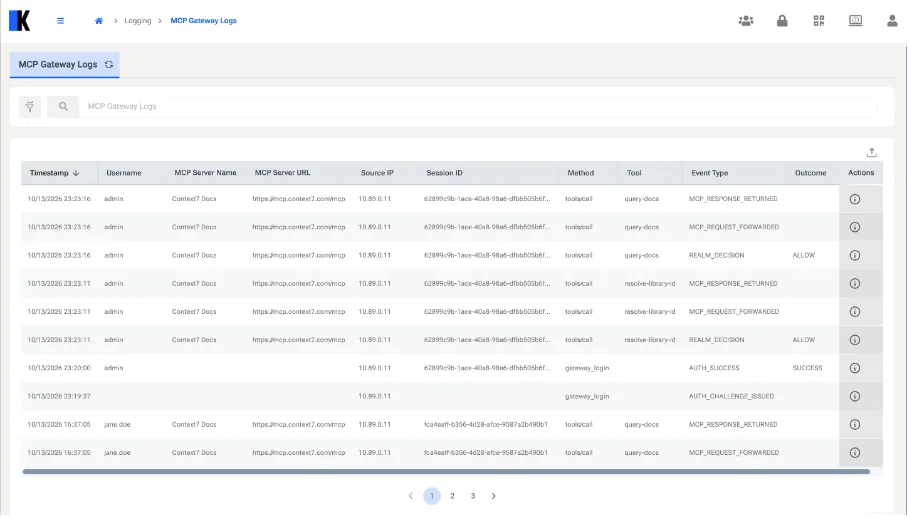
The MCP Gateway Logs page contains the columns listed in the following table.
Column | Description |
|---|---|
Timestamp | The date and time of the event in your local time zone. |
Username | The Kron PAM user of the gateway session. |
MCP Server Name | The MCP server of the request. |
MCP Server URL | The upstream URL of the MCP server. |
Source IP | The IP address of the AI client. |
Session ID | The gateway session. All events of a session share the same value. |
Method | The MCP method of the request, such as tools/call. |
Tool | The tool that the AI client called. |
Event Type | The type of the event. |
Outcome | The result of the event, such as ALLOW for a Realm decision or LOGGED_OUT for a sign-out. |
Actions | Opens the MCP Request Details modal of the event. |
| |
Kron PAM records the MCP Gateway event types listed in the following table. For a single tool call, the gateway writes REALM_DECISION, MCP_REQUEST_FORWARDED, and MCP_RESPONSE_RETURNED records in this order.
Event Type | Description |
|---|---|
REALM_DECISION | The gateway evaluated the Realms. The Outcome column shows ALLOW or DENY. |
MCP_REQUEST_FORWARDED | The gateway forwarded an allowed request to the MCP server. |
MCP_RESPONSE_RETURNED | The MCP server returned a response to the gateway. |
USER_LOGOUT | The user ended the session with the gateway_logout tool. |
AUTH_CHALLENGE_ISSUED | The gateway asked the user to sign in. |
AUTH_SUCCESS / AUTH_FAILURE | The sign-in succeeded or failed. |
Click the icon in the Actions column to open the MCP Request Details modal. For an MCP_REQUEST_FORWARDED record, the modal shows the tool name and its arguments. For an MCP_RESPONSE_RETURNED record, the modal shows the content that the MCP server returned.