Private Group for Password Vault Account
In Kron PAM, users who do not have the SAPM Group Manager or SAPM Group System Manager role cannot normally create a Vault Group for themselves.
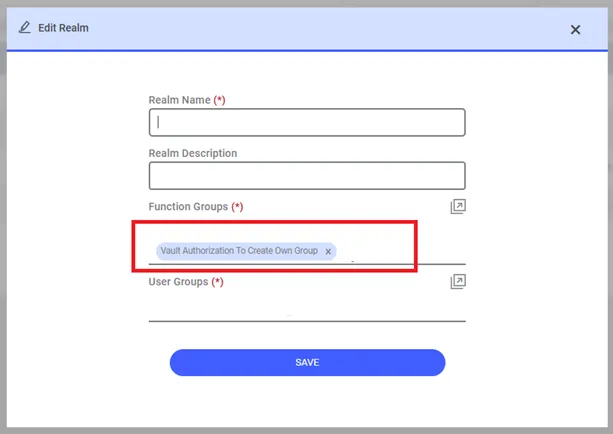
Users can be granted the authority to create a Private Group via the “single.connect.sapm.authorization.create.own.group” role definition in the Portal role definition screen.
1. Navigate to Policy > Portal Definition.
2. Open the Realm Definition tab.
3. Add the function group “Vault Authorization To Create Own Group” for the user group.
When a user with this role opens the Vault screen, the “Private Group” will be listed under the section displaying “Account Groups”. Kron PAM will create a group name using “User_Name” and list it under “Private Group”.
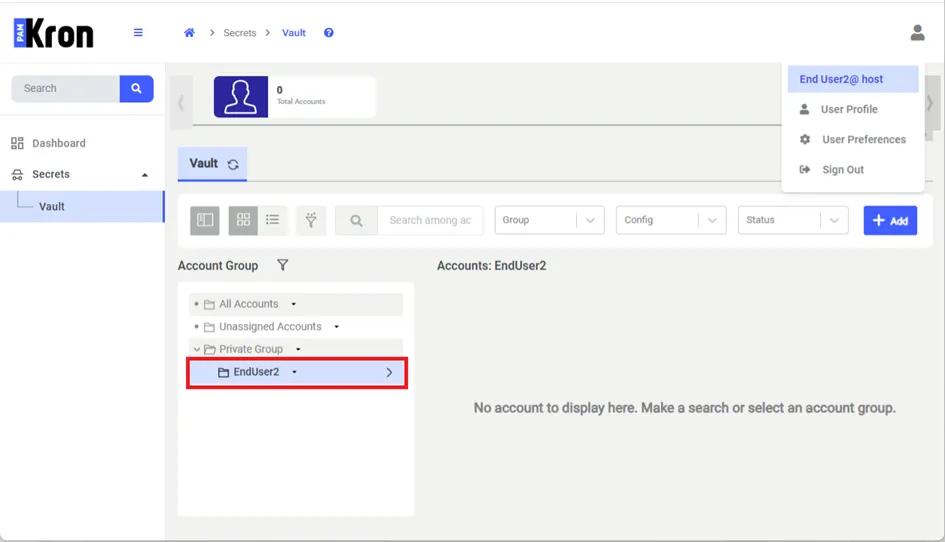
Users cannot rename or delete this Private group, but can create sub-groups under this group and share them with other users by configuring permissions.