Log Management
The Log Management screen provides centralized control over system-generated log records and their automated cleanup. administrators can use this screen to define retention periods for each log type, configure cleanup job schedules, enable or disable individual log management rules, and monitor job execution history.
Primary purpose of this feature is to prevent uncontrolled database growth, maintain system performance, and automate the lifecycle management of log data across the platform.
Log management is designed to handle high-volume log tables produced by kron pam components. the following log types are supported:
· User authentication log
· Radius account log
· Tacacs account log
· Activity log
· Http proxy log
· Video session log
· OCR log
Each log type can be assigned an independent retention threshold and cleanup schedule, allowing administrators to apply different policies based on the volume and criticality of the data involved.
Before configuring log management rules, the LogManagementScheduler job must be registered and triggered via the Job Scheduler screen.
Once active, this job performs the following operations at each execution cycle:
1. Reads all records in the log management configuration table
2. Identifies records where the Enabled flag is set to active
3. Evaluates the Start Time and Time Period of each record to determine whether a cleanup job is due for execution
Note: the LogManagementScheduler must be manually triggered at least once After registration to initialize the scheduling cycle.
To define a new log cleanup schedule, follow the steps below:
1. Navigate to the Log Management screen from the administration menu.
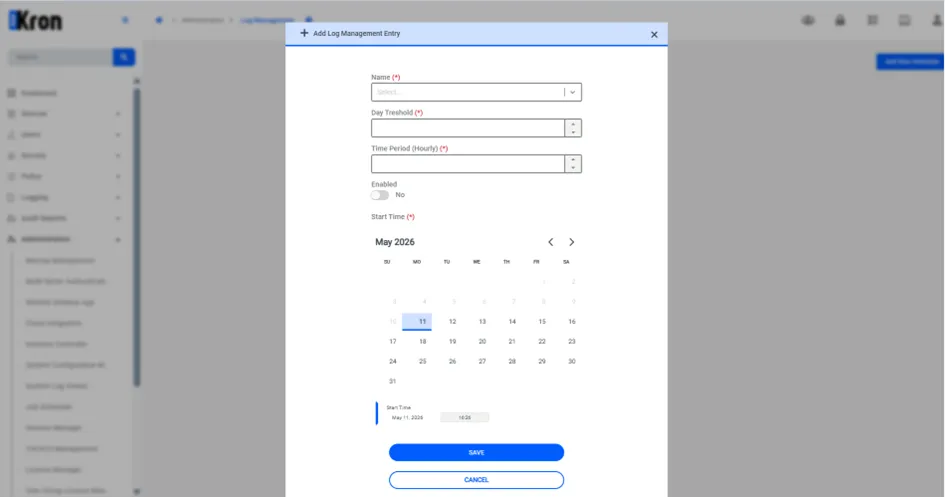
2. Click the Add New Scheduler button to open the rule creation form.
3. In the Name field, select the target log type from the dropdown list (e.g., Activity Logs).
4. Set the Day Threshold value to define the retention period. log records older than the specified number of days will be automatically deleted during each cleanup run. for example, setting this value to 2 will remove all records older than two days.
5. Set the Time Period value to define the execution frequency of the cleanup job. for example, a value of 2 means the job will run every two hours.
6. Use the Enable toggle to activate or deactivate the rule. only enabled rules are processed by the LogManagementScheduler.
7. Specify the Start Time to define when the first execution of the rule should occur. subsequent executions will follow the configured time period interval from this initial timestamp.
8. Click Save to persist the Log Management rule.
Field | Description |
|---|---|
Name | Identifies the log type to be managed. Each log type corresponds to a specific database table. |
Day Threshold | Defines the retention period in days. Records older than this value are deleted on each job run. |
Time Period | Defines the interval (in hours) at which the cleanup job executes. |
Enable | Activates or deactivates the rule. Disabled rules are skipped by the scheduler. |
Start Time | Sets the initial execution timestamp. The scheduler uses this as the reference point for subsequent runs. |