Listing AWS Devices
The imported AWS devices are listed in the Device Inventory:
- Navigate to Devices > Inventory.
- AWS Devices with specified tags will appear inside the Device Group recently created.
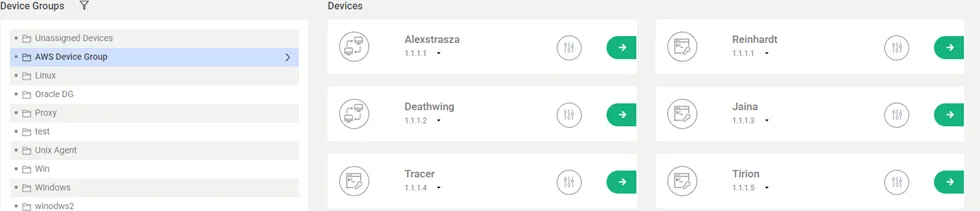
Imported AWS Devices
AWS Instances are automatically synchronized on Kron PAM but the Device Realm should be set manually for user access to devices as well as for policy enforcement (see also sections Device Management and Policy Management)
Devices can be displayed in the SSH Proxy by using an SSH client. To list devices with tags in the SSH Proxy, define the nssoapp properties below:
- Connect to Kron PAM from an SSH client as a Kron PAM admin user.
- Set the nsso.show.device.tag.names parameter in /pam/ssh/conf/nsso.properties Ex: nsso.show.device.tag.names=Region, server-type, os, customer, Name
- Restart the nssoapp service sudo systemctl restart pam-ssh
After this configuration, AWS devices in an SSH Proxy will be displayed with their tags.
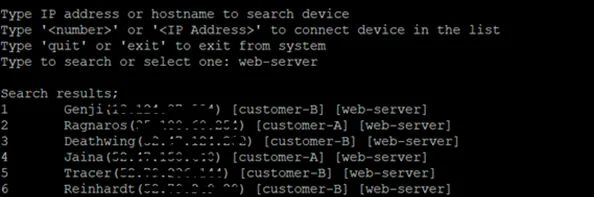
AWS Tags
It is also possible to list the devices in more detail. To do this, add “;-l” after your search query.
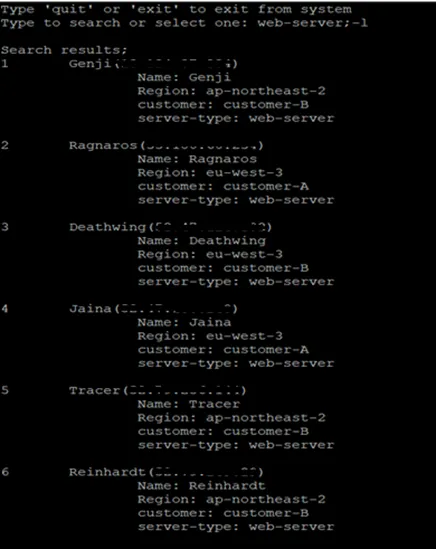
AWS Tags