HTTP Proxy Logging Headers
This feature is utilized to log the requests and responses from websites visited by users.
To use the HTTP Proxy Logging Headers feature on individual webpages defined as devices in Kron PAM:
The parameter http.proxy.logging.headers.enabled in the /pam/http/conf/http_proxy.properties file must be set to true.
A new parameter, httpRequestandResponseHeaderLogged, will be introduced to the Device Group Custom Properties. When this parameter is set to true for the relevant device group, Kron PAM will log the Request and Response Header information.
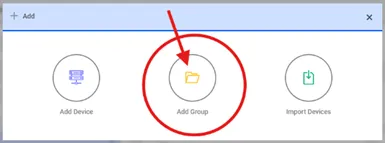
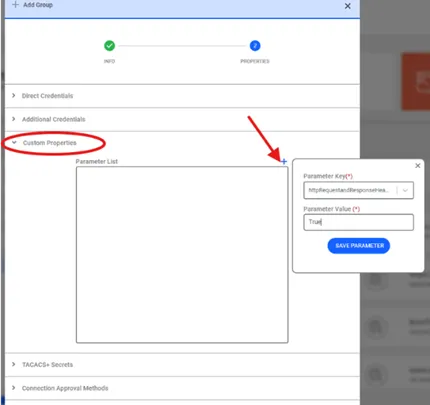
Users can access the logged Request and Response Header information for HTTP requests via the HTTP Proxy Logs screen. Upon clicking the Show Headers button for a log entry, header details for the selected request will be displayed.
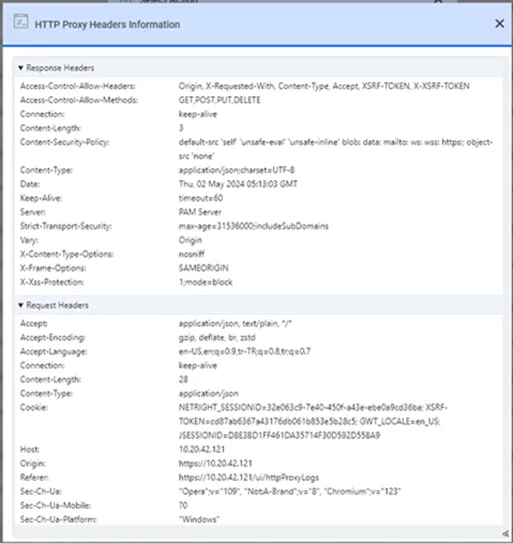
After setting the http.proxy.logging.headers.enabled parameter to true in the /pam/http/conf/http_proxy.properties file, the httpRequestandResponseHeaderLogged parameter must also be defined for the relevant device group. Request and Response logging will only occur if both parameters are configured correctly.
If the http.proxy.logging.headers.enabled parameter in the /pam/http/conf/http_proxy.properties file is set to true and the http.proxy.passthrough parameter is also set to true, the Request and Response values will be logged unconditionally, regardless of the device group parameter settings.
After these configurations, the HTTP Proxy will start creating a log for every visited webpage. Log files can grow over time, filling up the system's disk capacity and causing a decline in system performance. Therefore, it is recommended that administrators use their discretion to decide on which device groups header logging should be activated, and on which it should remain inactive.