Configuring Element Types
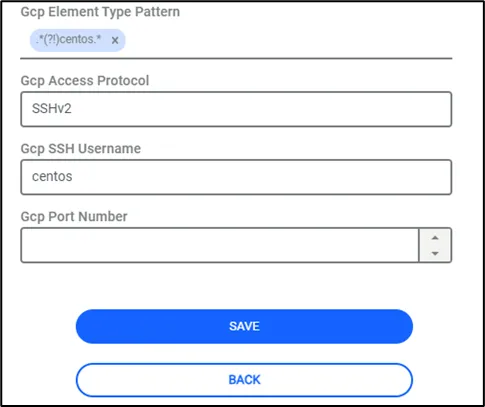
Define the Element Type properties shown below, so that Kron PAM can identify the OS of the discovered instances:
- Navigate to Devices > Element Type.
- Create a new element type and add Google Cloud tag.
- Click the Next button of the related element type.
- Fill in the GCP Element Type Pattern, GCP Access Protocol, and GCP SSH Username properties.
Parameter Name | Parameter Value |
|---|---|
GCP Access Protocol | Mandatory. This property is used to determine the default access method for the discovered instances |
GCP Element Type Pattern | Mandatory. The pattern can be defined as multiple in one element. This pattern is checked against the “Image” description of the instance to determine the OS type. |
GCP SSH Username | Mandatory for logging in. Not required for device import. This username is used as the default login credential. |
GCP Port Number | Optional. Devices are imported with the defined port number value. If this value is not set, a default port number is used, such as 22 for SSH. |
In addition to these configuration parameters, devices can be added by identifying the element type based on their labels.
Parameter Name | Parameter Value |
|---|---|
device.import.gcp.element.os.tag.key | Label key to be used in detecting the device's element type |
device.import.gcp.element.os.tag.value | Label value to be used in detecting the device's element type (Regex) |
Devices must be identified according to their element types and added to Kron PAM with their element types. Examples: CentOS Linux, Ubuntu Linux, etc.