Azure AD Configuration for Multitenancy
Azure AD SAML feature is also supported for multitenant environments.
For this, some parameters in the Kron PAM Application created on the Azure side must be edited to accommodate for tenants previously created on Kron PAM.
To use SAML on Host:
- Go to the newly created Kron PAM Application.
- Choose Single Sign-on on the left pane.
- Choose SAML.
- Click edit for Basic SAML Configuration.
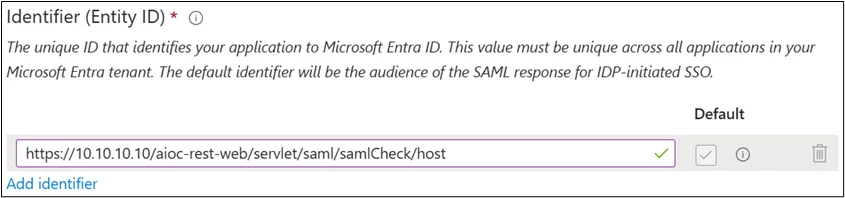
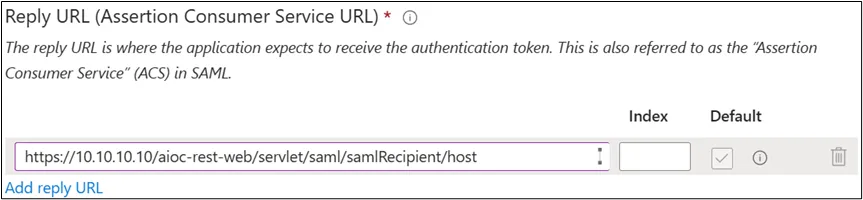
- Add /host to the values shown in the images below.
Identifier (Entitiy ID): https://10.10.10.10/aioc-rest-web/servlet/saml/samlCheck/host
Reply URL: https://10.10.10.10/aioc-rest-web/servlet/saml/samlRecipient/host
Logout Url: https://10.10.10.10/aioc-rest-web/servlet/saml/samlLogout/host

For Tenant:
- Go to the newly created Kron PAM Application.
- Choose Single Sign-on on the left pane.
- Choose SAML.
- Click edit for Basic SAML Configuration.
- Add /tenantname to the values shown in the images below. (shown as tenantx below)
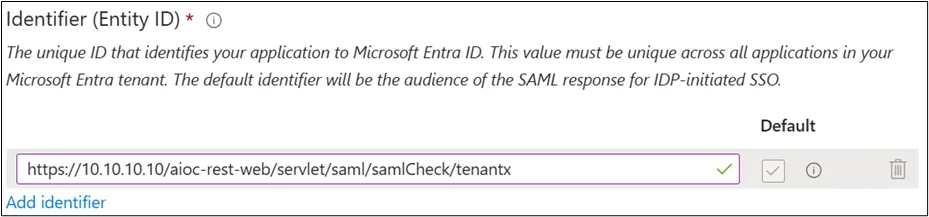
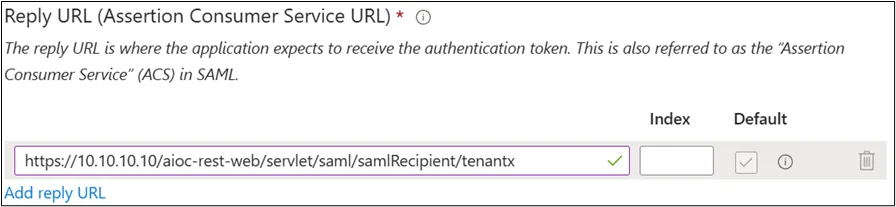

The SAML configuration parameters on the Kron PAM side and the TomcatCorsFilter configurations under /pam/gui/conf/web.xml will be the same as the information under the Azure AD Configuration heading.
To enable different methods option on Multitenant environments, this parameter must be set on System Configuration Manager:
- Open Administration > System Configuration Manager > Add New System Parameter.
- Add aioc.login.different.methods.enabled as true.