Approval Extra Notification
Within KronPAM, SMS notifications can be sent via the Extra Notification mechanism to inform other requester and approver users involved in a request process.
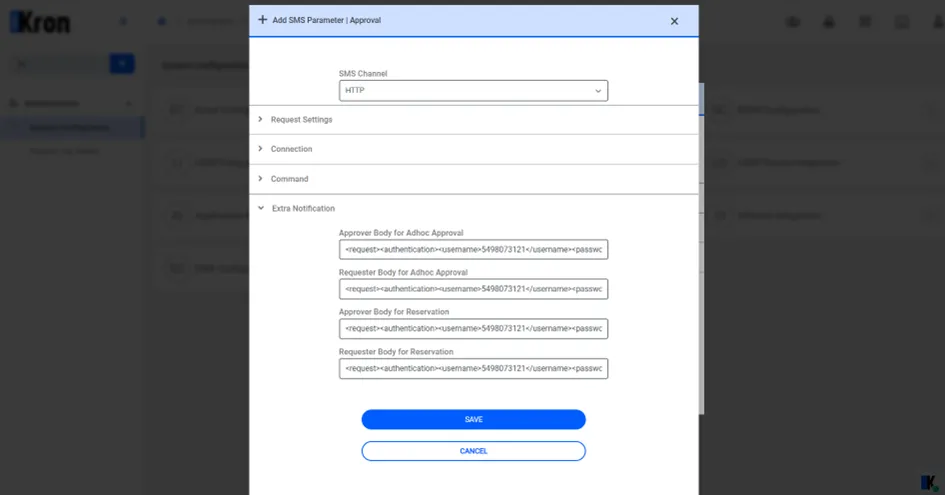
In the KronPAM Extra Notification structure, a total of four different SMS contents can be defined: for both instant (adhoc) and reservation processes, and separately for requester and approver roles. This allows customized messages to be sent for each scenario and user role.
· Approver Body for Adhoc Approval This field defines the SMS content to be sent to the approver user for instant (adhoc) access requests.
· Requester Body for Adhoc Approval This field defines the SMS content to be sent to the user (requester) who creates the instant (adhoc) access request.
· Approver Body for Reservation This field defines the SMS content to be sent to the approver user for reservation (scheduled) requests.
· Requester Body for Reservation This field defines the SMS content to be sent to the user (requester) who creates the reservation request.
This operation is performed using the phone numbers defined for users in the system and works by sending an XML-formatted request to an external SMS service provider.
For instance(Extra Notification):
<request>
  <authentication>
    <username>555555555</username>
    <password>1111111yyyyy</password>
  </authentication>
  <order>
    <sender>KRON</sender>
    <sendDateTime></sendDateTime>
    <message>
      <text><![CDATA[
        Your approval is requested by %user% %device% %connection_username%
      ]]></text>
      <receipents>
        <number>%phoneNumber%</number>
      </receipents>
    </message>
  </order>
</request>
The example value for each field is shown in the table.
approval.sms.http.headers | Content-Type: application/json\rAuthorization: Basic ***== |
|---|---|
approval.sms.http.method | POST or GET |
approval.sms.http.encoding | UTF8 |
approval.sms.http.delimiter | default:& |
connection.approval.sms.http.body | <request><authentication><username>5498073121</username><password>Ey250490</password></authentication><order><sender>KRON</sender><sendDateTime></sendDateTime><message><text><![CDATA[Your approval is requested by %user%. You can manage the approval request by using the link: %approveRejectLink%]]></text><receipents><number>%phoneNumber%</number></receipents></message></order></request> |
connection.expired.sms.http.body.request.owner |
|
command.approval.sms.http.body | <SMSRequest> <Username>XXXXXXXX</Username> <Password>XXXXXXXX</Password> <From>JAZZUATSingleConnect</From> <To>%phoneNumber%</To> <Message>Your approval is requested by %user%. You can manage the approval request by using the link: %approveRejectLink%</Message> <urdu>0</urdu> <statuscode/> <Identifier/> <UniqueId/> <ProductId/> <Channel/> <TransactionId/> </SMSRequest> |
command.expired.sms.http.body.request.owner | - |