Adding Static Configured Static Accounts in Vault
It is possible to add a static account to the Vault without connecting to any device, and keep it encrypted in the Kron PAM Vault database.
To add a Static Configured Static Account:
- Navigate to Secrets > Vault.
- Open the Vault tab.
- Click on to Add button and select Add Account.
- Enter the Type (Static), Account Name, Description, Group Name, Private, Owner, Additional Info, Username, Password and Configuration. (Configuration is a predefined STATIC Strategy. Kron PAM has pre-defined configurations for Password Vault, but Static Strategy Configurations can be added from the Configuration tab without any device configuration.)
- Click Save.
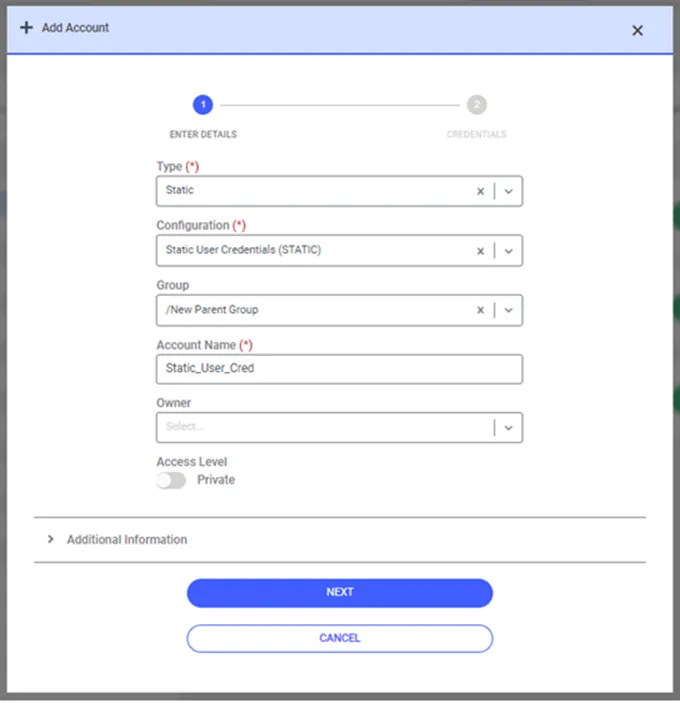
Adding Static Configured Static Accounts
There is a password counter feature for Static Configured Static Accounts. With this feature, an account in Password Vault cannot update the old password value in the counter specified.
To activate this feature, the following parameters have to be defined in the System Configuration Manager:
Parameter Name | Parameter Value |
|---|---|
sapm.old.password.history.enabled | true |
sapm.old.password.history.count | %number% (Default is 5) |