Using Authentication Key (FIDO Key) for MFA
This feature is only applicable to the Kron PAM Portal login, and it works in conjunction with the token method. For a user, both the FIDO Key and the MFA Token work with FIDO Key priority. The FIDO Key is activated separately for each user. If the FIDO Key is not defined for other users in a group containing a user with a FIDO Key and MFA is active for that group, other users will be asked for tokens.
For this integration to be secure and stable, please make sure Kron PAM is accessible with a valid HTTPS certificate.
To register a FIDO Key:
- Log in to the Kron PAM Web GUI.
- Go to the User Area in the upper right corner.
- Select User Profile > About Me.
- Click Register FIDO Key.
- Enter the FIDO Key when prompted.
- Registration Successful.
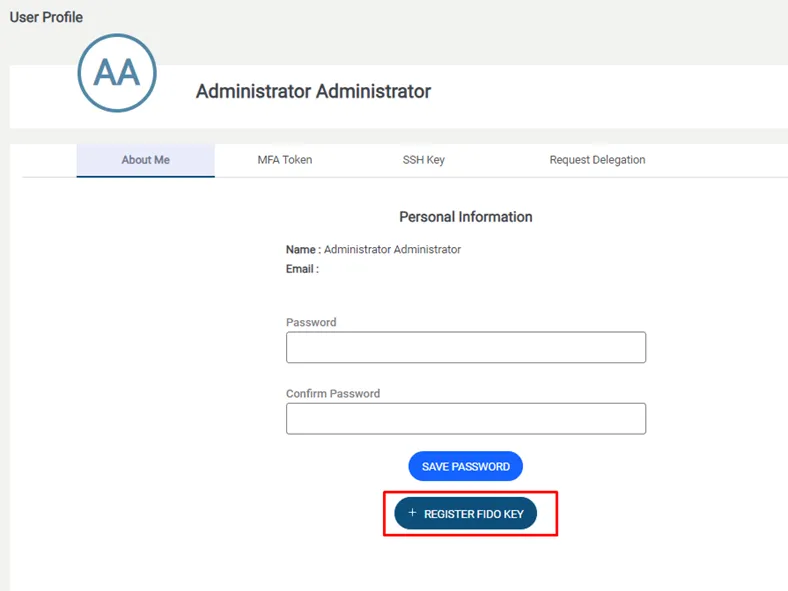
Register FIDO Key
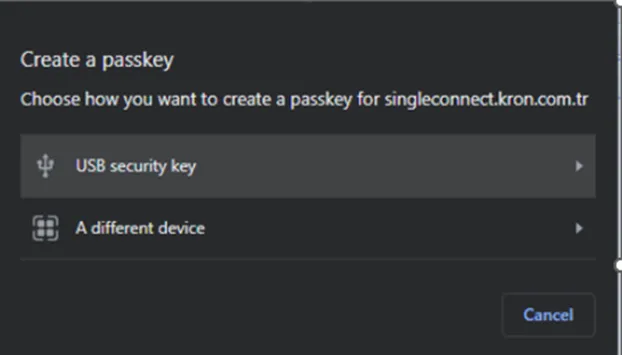
Register FIDO Key
The previously registered key can be removed by clicking Remove FIDO Key under Account Settings.