User Group Definition Tab
The User Group is under the User Menu. User Groups can be created, edited, and deleted from this page. User Group features are addressed in this section.
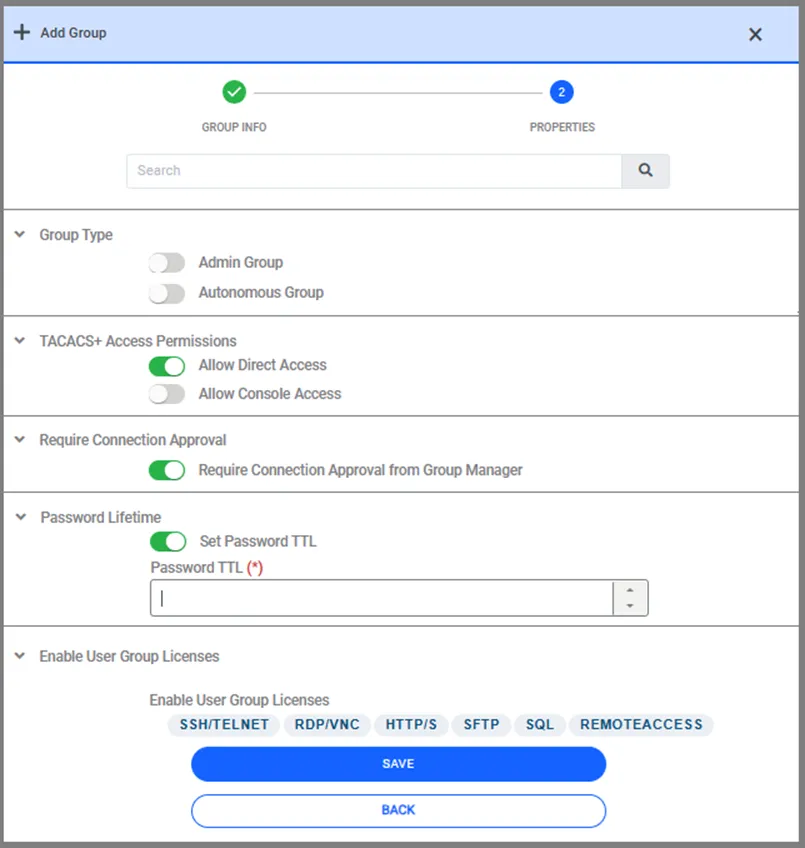
Group Type: This panel includes 2 types. Admin Group: This checkbox assigns Admin rights to the group. Autonomous Group: This checkbox defines the autonomous users’ group (e.g., script users). This group’s users may be excluded in RADIUS logs to avoid creating a log flood. These users’ passwords never expire
TACACS+ Access Permissions: Direct Access: When Kron PAM is configured as an AAA or TACACS+ server for devices with AAA with TACACS+ protocol, the “Direct Access” checkbox needs to be checked. All connections should go through Kron PAM. Console Access: Similar to the “Direct Access” permission, this checkbox gives the AAA and TACACS+ devices console access.
Password Life Time: Set Password TTL: Defines whether TTL is used for the relevant group. Password TTL (Days): Defines the maximum time allowed for the use of passwords for users in the configured user group. When a user’s password reaches its TTL, they are forced to change it the next time they log in. Setting this feature “s ”-1" means that the password of the users in this group will never expire. If this value is set “o”"0" (zero) or left empty, the user group, and consequently the users, will be ignored during the password expiration control. By setting the system parameter to "notify.user.before.TTL.password.expire," users can receive email notifications a certain number of days before their password expiration date.
Require Connection Approval: Require Connection Approval from Group Manager: Defines whether the Connection Approval process will be used.
Enable User Group License: Determines whether the protocols to be used by the relevant group will be activated or not. The priority condition for these selected protocols is that the License definition has been made.