User Actions Menu
After searching for a user, a menu button on the right side of the user’s entry can be accessed. The available actions of this menu are illustrated below.
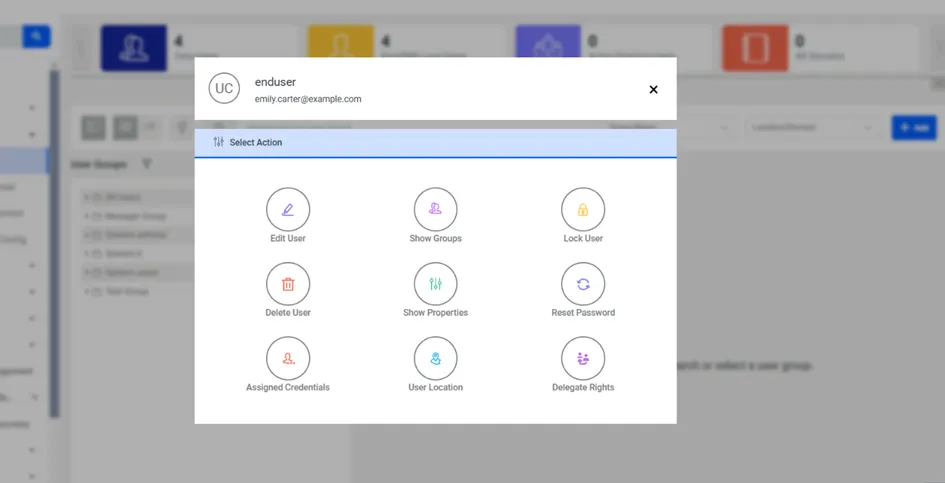
Edit User: Edit user information.
Delete User: Delete a user.
Reset Password: Force the user to change password.
Show Groups: Show the user groups the user belongs to. The user can also be added to or removed from other groups via this option.
Show Properties: Show the user’s properties. Properties can be added, edited, and deleted.
Lock User: Lock the user. Locked users cannot log in to the system. The error message "Your account is locked. Please contact your administrator." is displayed on the login page. Locked accounts can be unlocked by clicking the Unlock User button that takes place of the Lock User button.
Delegate Rights: The system administrator and the users can delegate the user right to approve or reject various requests from other users for a specific period of time. Delegation rights can be set from the pop-up that opens when clicking the Delegation Rights option.
User Location: When the Location Confirmation action is set up for some black key commands, users with a User Location must confirm via the Kron PAM mobile application that they are around the designated coordinates in order to do what they intend to do.
Assigned Credentials: List the Vault credentials assigned to the users. See Assigned Credentialsthis for more information.