Password Retrieval Approval Notifications
An approval requirement mechanism for password retrieval can be established for user groups that share a device group realm with the device that contains the Vault account. To set up an approval requirement for a user group:
- Navigate to Policy > Portal Functions.
- Open the Realm Definition tab.
- Click the Add button.
- Select the SAPM Approval Requirement Function Group and the User Group (The SAPM Management function group still needs to be included in the realm, to allow the users to see the Vault Management portal)
- Click Save.
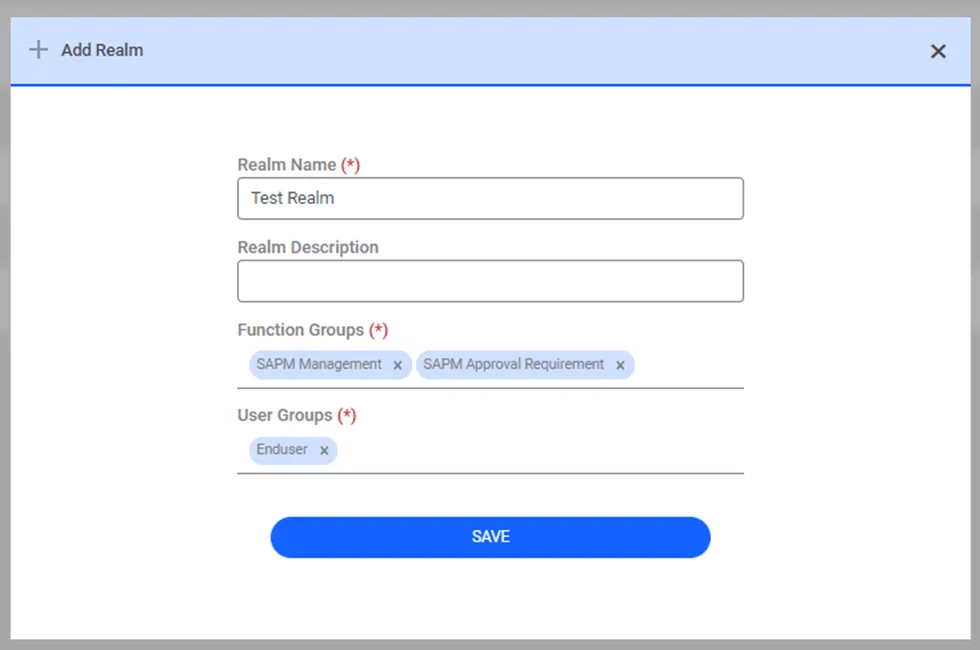
Portal Functions Realm or a Password Vault Approval Requirement Group
When a user requests the Account password and needs administrative approval, a Password Vault Approval Request email is sent to the following users:
- Members of the user groups with FULL_CONTROL permission over the Vault account for which the approval request was sent.
- Members of the user groups with the portal function single.connect.sapm.admin or single.connect.sapm.network.admin (or the Password Vault Admin or Password Vault Network Admin function groups)
single.connect.sapm.admin | Grants rights to manage all Vault accounts and view all logs. |
|---|---|
single.connect.sapm.network.admin | Grants rights to manage and view all accounts of the devices defined to the user. |
The approval email sent to the above users contains:
- Vault Account Name
- Vault Group Full Path
- Approval Level
- Permission information from the email content below.
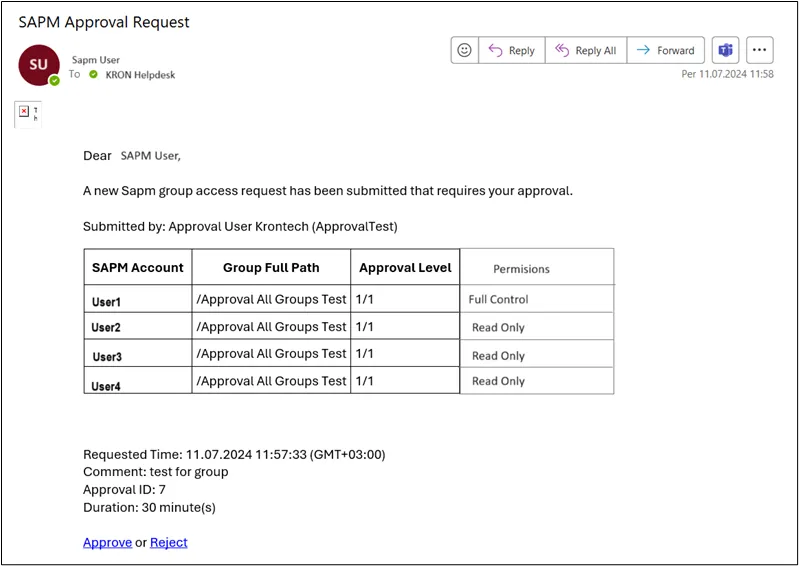
Vault Approval Request -mail