Parametric Solution
The command-line argument is a kind of parameter supplied to the program when it is invoked. Some applications can receive parameters from the command line as launch arguments. These kinds of applications are configurable with appropriate parameters from Kron PAM. So, we can start by calling these applications with parameters. Kron PAM runs these kinds of applications with preconfigured parameters through the RDP protocol. All information including sensitive data is transmitted inside the RDP protocol securely.
To configure the Parametric Solution:
- Navigate to Devices > Inventory > Device Groups.
- Select the device group you want to edit and select Remote Apps.
- Set the Enable Auto Login.
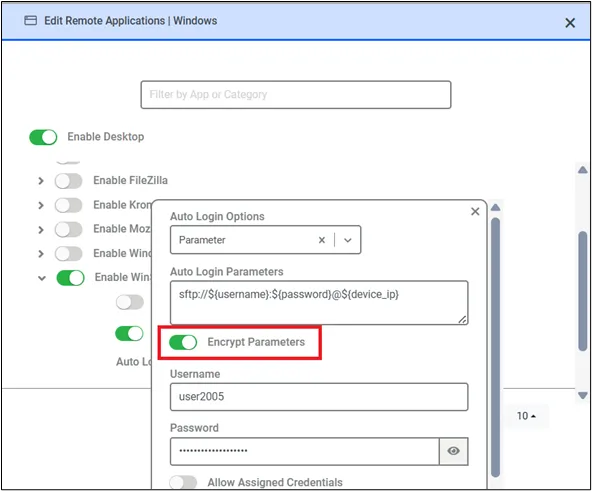
- Click the Auto Login Options button and fill in the required fields with the information shown in the image above.
- Select Auto Login Options as Parameter and then configure it accordingly.
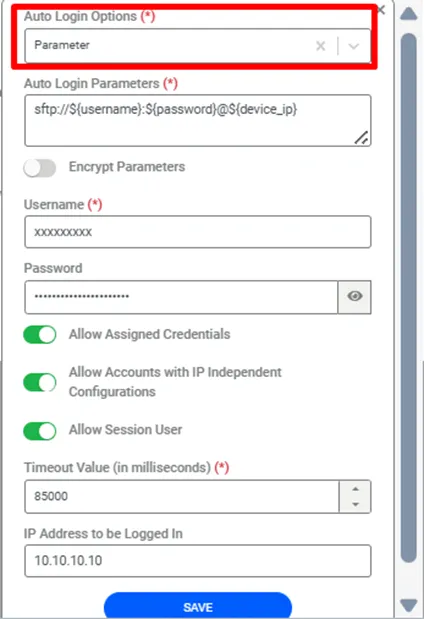
The figure above shows that the WinSCP application receives some parameters such as username, password, and device IP. This syntax is specific to the WinSCP application. Other applications can have similar syntaxes, so we can define the applications’ parameters and fill in the necessary fields as we do in the OCR section. OCR and Parametric solutions use a common screen, and configurations are the same.
The Encrypt Parameters checkbox is shown in the remote app configuration screen.
For example, when the arguments are "arg1 arg2 arg3" and "Encrypt Parameters" is checked, a single encrypted argument will be sent as below;
ENCRYPTED:5PM3dh4VJn2TbE1iJXjlTg==