IP Authorization
The IP Authorization feature allows policies to be managed for connections from specified IPs. If a connection from a privileged IP is to be a privileged request, the action for this connection policy should be defined as Location Confirmation. The following steps describe the necessary configurations:
- Navigate to Users > User Groups.
- Select the existing User Group.
- Click on the user's Action Menu.
- Click on the User Location.
- Select + at the top right.
- Enter the Location Description and Location Type (IP Location or Geo Location)
- If you select Geo Location, enter the Coordinates (Latitude, Longitude) and Maximum Distance (in meters).
- If you select IP Location, enter the IP Addresses and Subnet.
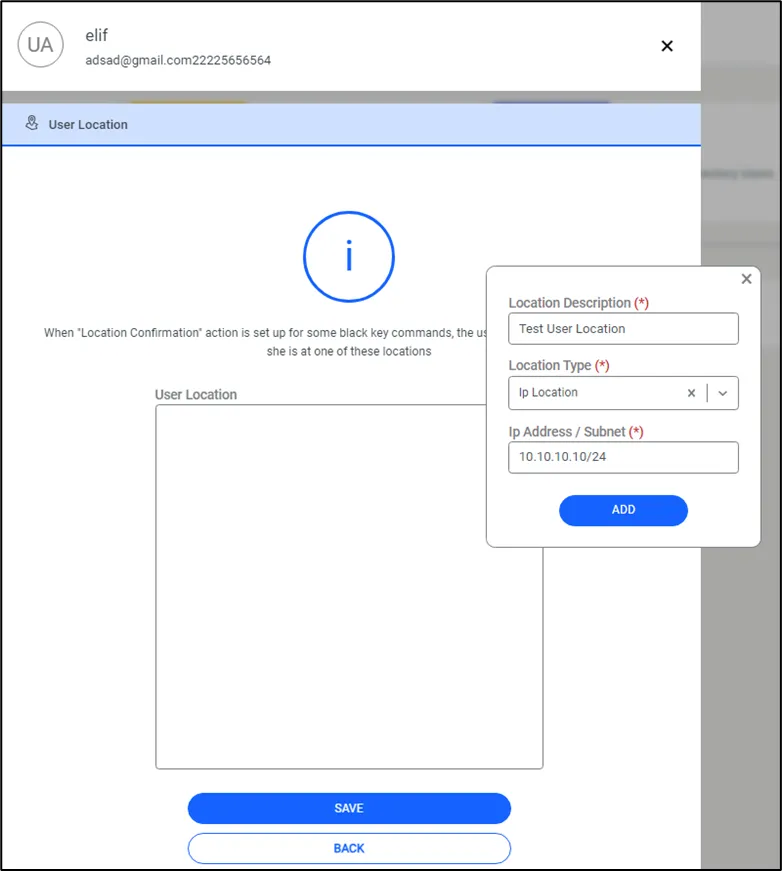
IP Authorization