Approval Workflow via Email Response
In KronPAM, approval or rejection processes can be performed via email without the need for a VPN connection. Usual emails only contain a link which may need an active VPN connection to work depending on Kron PAM setup, but with this structure, the system can now read incoming email content and complete the approval process accordingly. Users can easily complete their actions by either clicking the buttons within the approval email or replying directly to the message.
To configure the mail settings: 1. Navigate to System Configuration Manager > Integration 2. Click on the Approval Mailbox Configuration.

Enable Approval via Email: When this option is enabled, users can approve or reject requests by email. The system reads incoming emails to process approvals.
Host (*):The address of the email server to connect (for example: imap.zoho.eu, imap.gmail.com, etc.).
Port (*):The port number used to connect to the email server. Common value is 993 for secure (SSL) connection.
Protocol (*): The email protocol type. Normally, imaps (IMAP with SSL) is used.
SSL: When enabled, the connection is encrypted for security.
Address (*): The full email address of the mailbox that will be checked by the system. Example: [email protected]
Password (*): The password of the email account. This is used to connect to the mailbox.
Folder (*): The name of the email folder where incoming approval emails will be read. Usually this is INBOX.
TokenKey(*): A keyword that helps the system understand the reply email. For example, if the reply is TOKENPAM: APPROVED, the system reads it as an approval.
ScPolicyMailboxListenerJob should be enabled from the Job Scheduler screen and configured to run with a 10-second interval. The purpose of this job is to automatically check and process the replies to approval emails sent by the system at regular intervals.
When an action that requires approval (such as a connection reservation or instant connection request) is triggered, the related approval email is sent to the responsible manager. Clicking the "Approve via email" or "Reject via email" buttons open the mail composer of the e-mail client of the manager, and the manager needs to send the auto-generated e-mail without changing any part of the e-mail template (with the exception of the optional comment, if available). The approval reply sent by the manager is processed by ScPolicyMailboxListenerJob, and the approval status is updated in the system.
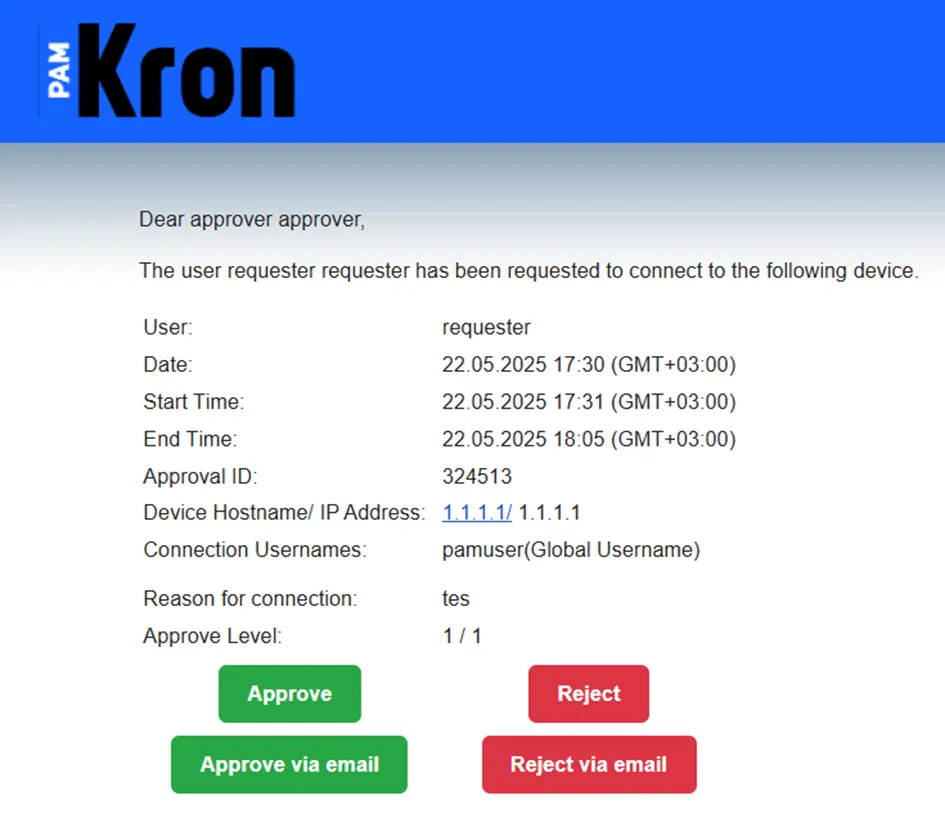
When a request is approved via email, the user should be able to successfully connect to the session with the approval granted.