Adding Devices Automatically
The LdapDeviceImportJob runs on Kron PAM to synchronize devices and device groups from the Active Directory. This job runs periodically and synchronizes the changes made since the job last ran to the Active Directory with Kron PAM, meaning any device added/removed on AD is directly added/removed on Kron PAM as well. To set the LDAP Device Import Job:
- Navigate to Administration > Jobs Scheduler.
- Open the Trigger List tab.
- Select LdapDeviceImportJob as the Job with the Add button.
- Fill in the Trigger Name and Cron Expression fields.
- To enable the job, select Enabled for the Active field and click Add Trigger.
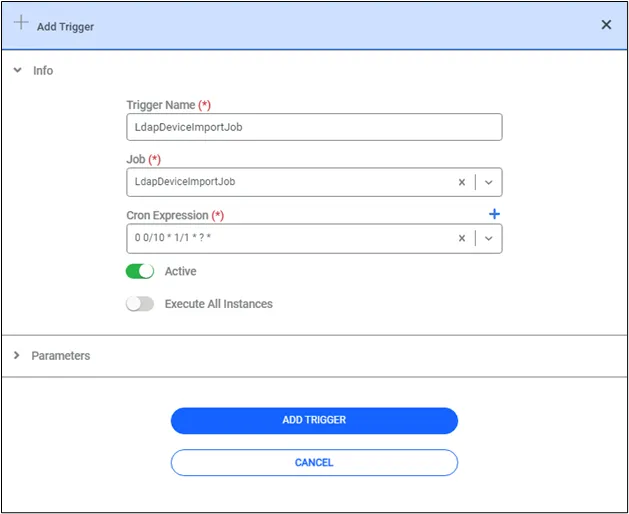
Add LDAP Device Import Job
The automated job period can be changed by editing the cron expressions.
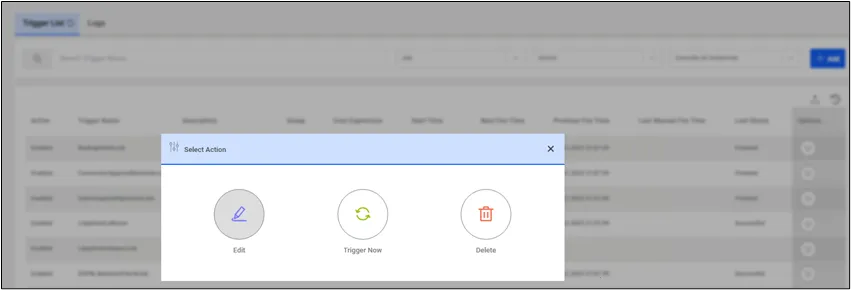
Edit LDAP Device Import Job