Configuring Kron PAM for Read-Only Access
To enforce read-only and read-write modes for specific users or user groups, add the following properties in the Kron PAM GUI. These properties are set under Device Properties.
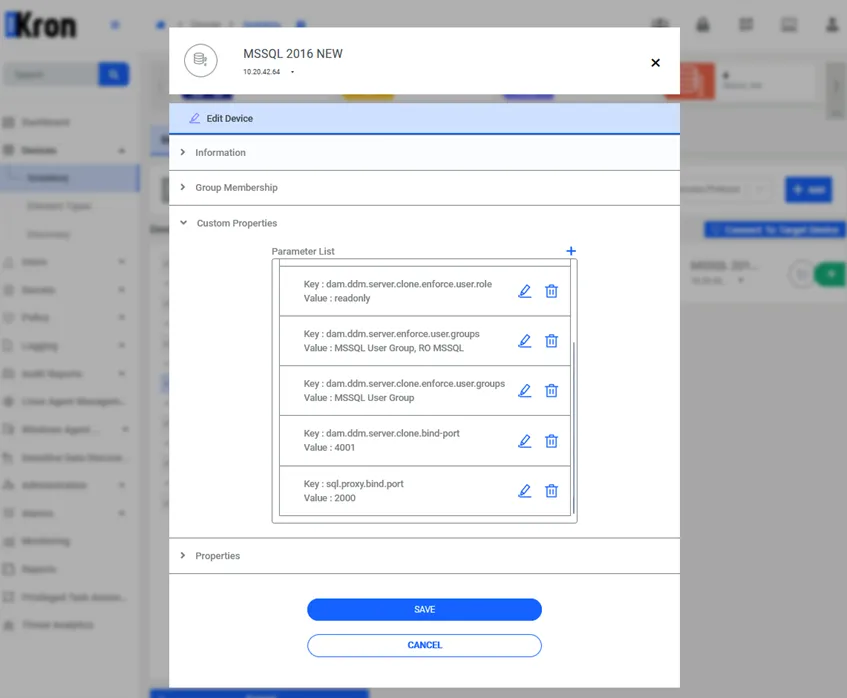
Application Read Only Properties in Kron PAM GUI
- dam.ddm.server.clone.enforce.user.role: readonly
- Enforces read-only behavior on the cloned port.
- dam.ddm.server.enforce.user.groups: UG1,UG2
- Defines the user groups forced to connect via the main (read-write) port. All users outside UG1,UG2 are not allowed to connect on the read-write port.
- dam.ddm.server.clone.bind-port: 4001
- The port number for read-only connections (the cloned port).
- dam.ddm.server.clone.enforce.user.groups: UG3,UG4
- Defines the user groups forced to connect via the read-only port. All users outside UG3,UG4 are not allowed to connect on the read-only port.