Check Account Password
The Check Password job is performed to check accounts managed by Kron PAM. Check Password can be performed manually by users or using a job running at certain time intervals. In this way, the account is kept up-to-date, and its validity is checked by Kron PAM. To be able to check an account, the device must be connected and the check.password.validation parameter must be set to true in the Password Vault Configuration.
To check the password:
- Navigate to Secrets > Vault
- Open the Vault tab.
- From the Account Options menu of the account whose password you want to check, select Check Password.
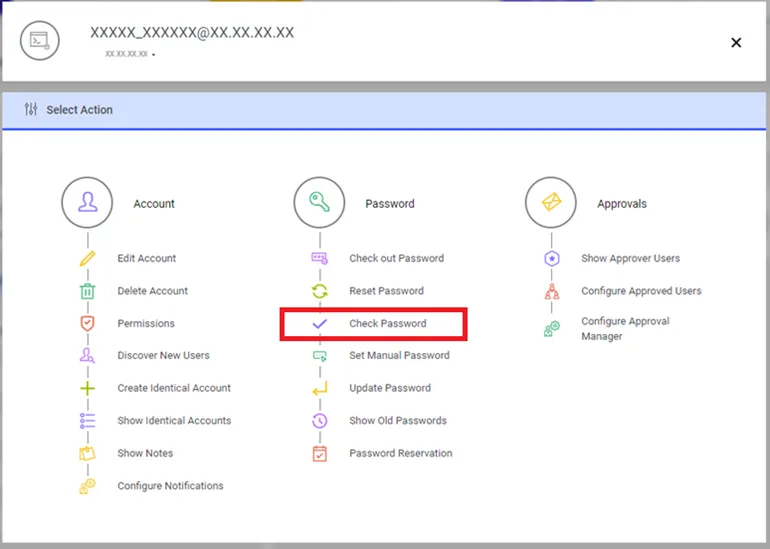
Check the Password option
To perform the Check Password operation on devices using the SSH Strategy with a Super User, the Check password with the Super User radio box in the Configuration screen must be set to On In this case, the system will perform the password check using the Super Username and password.
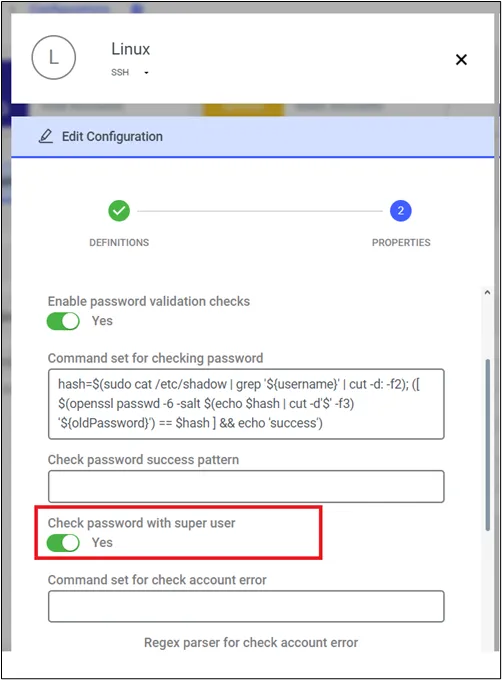
Check Password option with Super User for SSH Configuration