Password Validation Check
The Dynamic Password Controller checks the validity of stored passwords and SSH Keys regularly. If the password is changed without the Dynamic Password Controller, an alarm is generated, and a notification is sent to the system administrator.
To configure the password validity check:
- Navigate to Secrets >Configurations.
- Open the Vault Configuration tab.
- Select the Vault Configuration, and click the Green arrow button.
- Set Enable password validation checks? as Enable to check password validity.
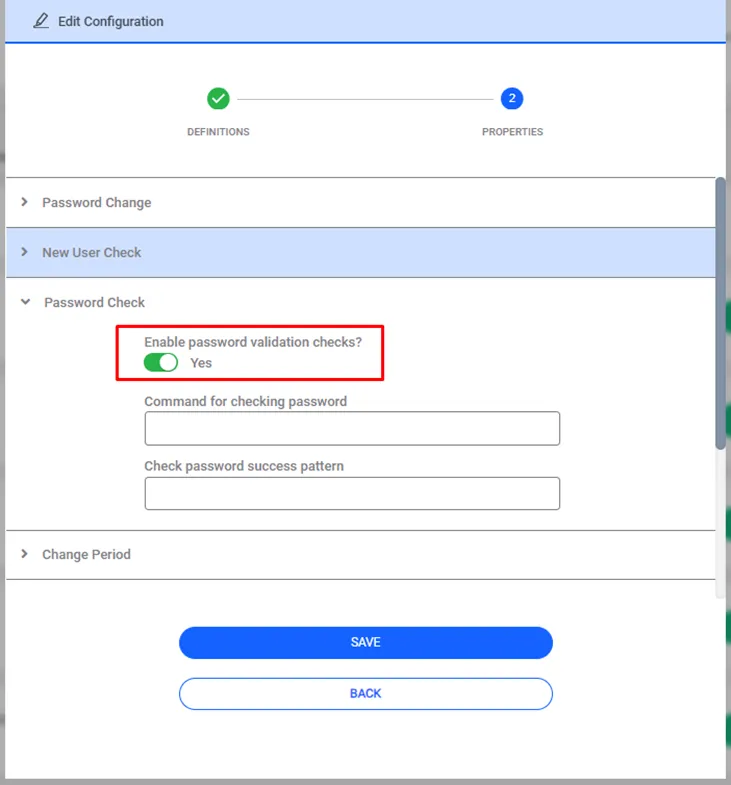
Password Validation Property Configuration
There is a job called SAPM_PasswordCheckJob that checks the validity of passwords. By configuring this job, the frequency of the password validation check can be defined.
- Navigate to Administration > Job Scheduler.
- Choose SAPM_PasswordCheckJob and click the Options and Edit buttons.
- Set the frequency of the job from the cron expression section.
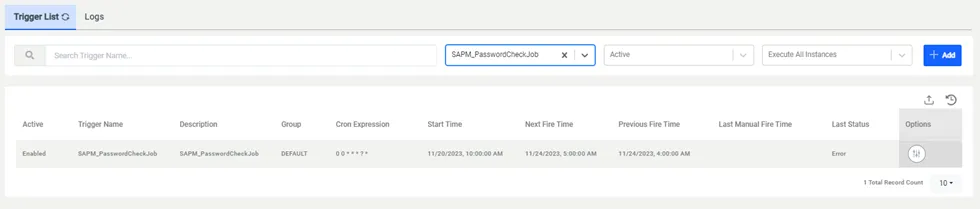
Password Check Job Cron Expression