RDP Profiles
3 min
Some of the permissions for RDP sessions can be grouped in RDP profiles. These profiles appear in the Policy Keys list in the Policy Groups screen, so they can be assigned to different Policy Realms to allow or restrict user permissions.
Currently, the following permissions can be set using RDP Profiles:
- Enable Clipboard: When selected, copy-paste operations from/to RDP servers are allowed. Copy and paste behavior may vary from browser to, as some web browsers, such as Firefox, do not allow applications to reach their clipboards. For our use of the clipboard so far, we refer to Chrome
- Disable Clipboard from Endpoint to Local: Upon enabling the clipboard user can choose to disable clipboard operations from the endpoint to local, this will prevent users from extracting clipboard data from the RDP session.
- Disable Clipboard from Local Endpoint: Upon enabling the clipboard user can choose to disable data from the endpoint, this will prevent users from uploading local clipboard data to the RDP session.
- Enable Download: File download operations to/from RDP servers are allowed when selected or disallowed when unselected.
- Enable Upload: File upload operations to/from RDP servers are allowed when selected or disallowed when unselected.
To create a new RDP Profile:
- Navigate to Policy > Policy > Add.
- Select the RDP Profile tab.
- Fill out the Name and Description fields.
- Select the permissions to be given and click Save.
- The RDP Profile now appears in the RDP Policy Data table.
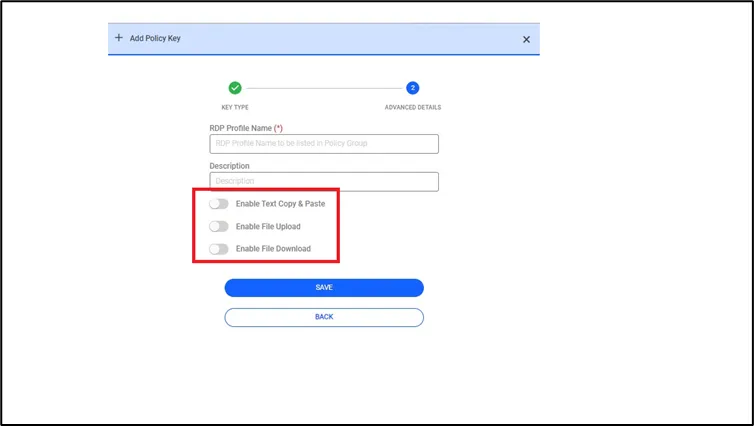
RDP Device Properties
To add this RDP Profile to a Policy Group:
- Navigate to Policy > Policy
- Click the Policy Group tab.
- Fill out the required fields.
- Select the RDP Profile and move it to the list box on the right.
- Click Save.
- The Policy Group now appears in the Search Results table.
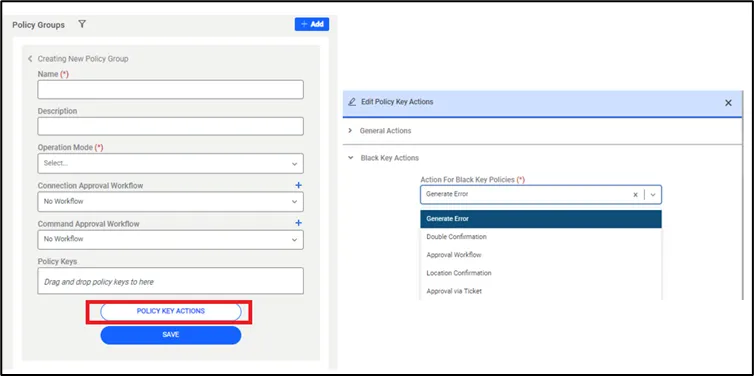
Policy Group with an RDP Profile included as a Policy Key
To link this Policy Group with a Device Group Realm, please refer to section Policy Realm Definition
The profile rules apply whenever an RDP Profile is part of a Policy Group included in a Policy Group Realm for the connection. When it is not included, the Device Properties will apply, regardless of the users that are connecting.