SAPM Mail List Notifications
An email list can be defined for each Device Group, to receive notifications when:
- A user retrieves a password for a SAPM account.
- A Password Reset Failed error occurs during the SAPM account password reset.
- The password cannot be verified during the periodic check of a SAPM account, due to a Password Check Problem error.
- A new user is detected on a device with an SAPM account (The new user detection feature depends on the configuration. It can be disabled for specific accounts).
To set the email list to receive these notifications:
- Navigate to Device Management > Device Groups.
- Right-click the device group containing the device of interest and select Show Properties.
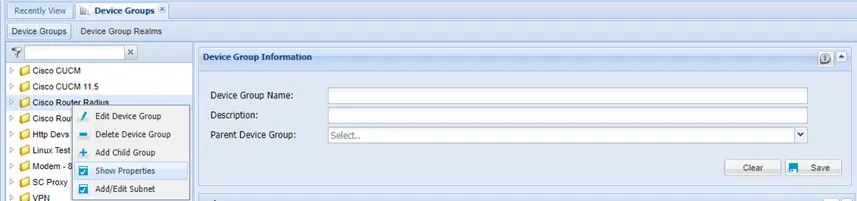
Device Group Properties
- On the Device Group Properties Information screen, select sapmMailList as the Property Key, enter the email address as the value, and click Save.
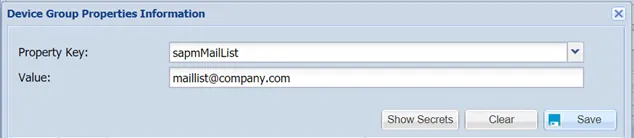
The “sapmMailList” Property in the Device Group Properties