New User Request Department Configuration
This feature is deprecated and will be removed in future releases.
After defining the email domain, set up which users can approve a New User Request:
- Navigate to User Management > User Accounts.
- Open the User Group Definition tab.
- Select the appropriate user group members and set the users as admins of the group.
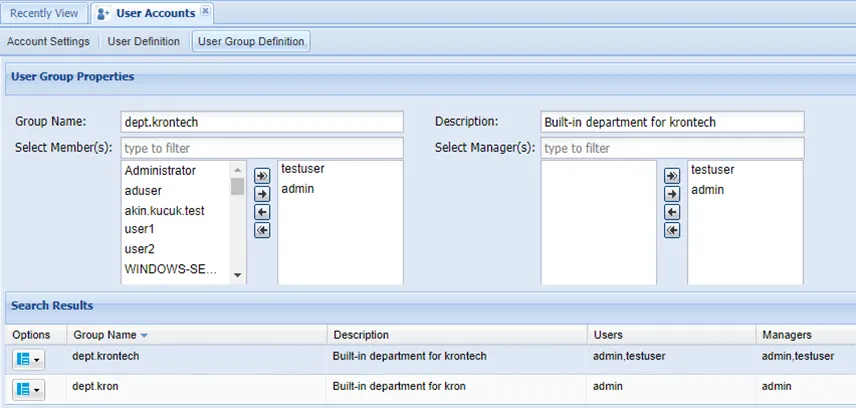
Department Admin Users
New User Request Approval
New user requests are displayed for approval in the User Approval window. Admins can approve or reject the request.
- Navigate to User Management > User Approval.
- Click the Search button to list all the user requests
- From the selected user’s Options menu, Approve, Pre-Approve, and Reject actions are available. (Pre-Approve is intended to escalate user approval to the next level. The user assigned as the Approval Manager can direct the request to another admin by selecting this option.).
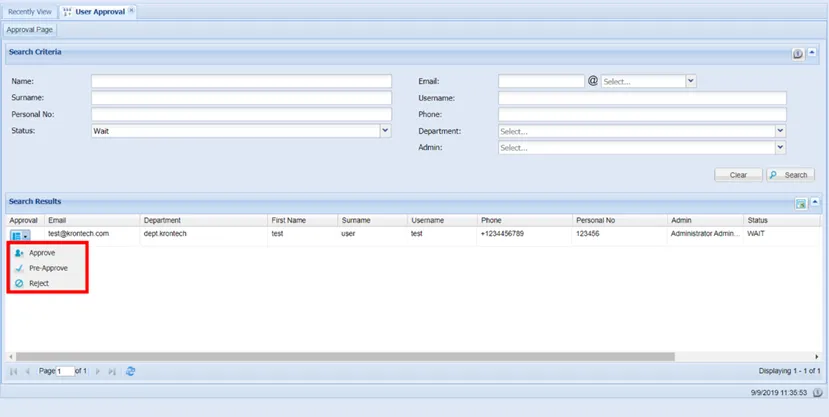
User Approval
The domain admins must have the users.approve.finalApproval portal function configured in order to have final approval authority for a new user request.