Multitenancy
The Kron PAM Multitenancy function can provide multiple and independent applications and functions. Kron PAM Multitenancy enables an architecture in which a single instance serves multiple customers. Each customer is called a tenant. Tenants may be given the ability to customize some parts of the application. Tenants are logically isolated from each other. Tenant admins can only manage devices and users that they are allowed to access and can only see the logs related to the permitted devices and users.
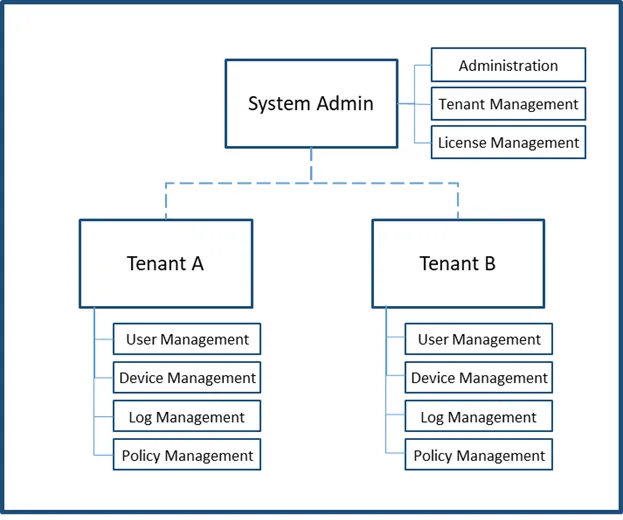
Multitenancy for Kron PAM
To enable multitenancy:
- Navigate to Administration > System Config. Man.
- Set multitenancy.enabled as true.
- Save configuration.
- Navigate to Portal Function > Function Group Definition.
- Give the function group a name and select the single.connect.tenant.admin function
- Save configuration.
- Open the Function Realm Definition tab.
- Give the realm a name, select a tenant admin user group and select the function group that you created on step 6 and Save.
- Restart the Netright-Tomcat service a. Establish an SSH connection to the Kron PAM IP address as the pamuser user. b. Run the systemctl restart pam-gui command to restart the service
In Multitenancy, Kron PAM supports up to 30 tenants. We do not support more than that.