Job Scheduler Logs
The Fired Trigger Logs consist of the following fields: Trigger ID, Job name, Trigger Name, Trigger Type (Manual/Scheduled), trigger Start time/End Time, Job Status (Running, Finished, Successful, Error), and Summary. To send the Fired Trigger Logs:
- Navigate to Administration > Job Scheduler.
- Open the Fired Trigger Logs tab.
- Fill in the fields to filter and click the Search button.
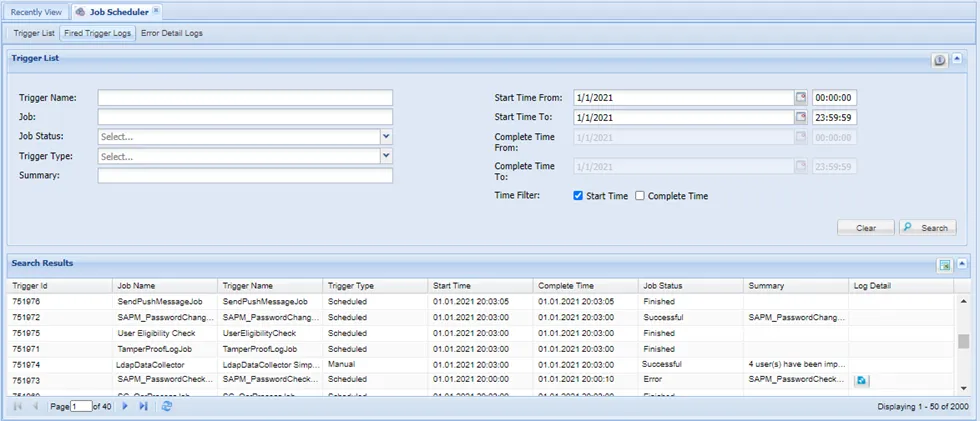
Fired Trigger Logs
- The Successful and Error status in the Job Status type only apply to SAPM and Ldap Data Collector Jobs.
- The Finished status in the Job Status type applies to jobs, except SAPM and Ldap Data Collector Jobs.
- The Summary field is filled only for SAPM and Ldap Data Collector Jobs.
- The Log Detail button is visible if errors occurred in the SAPM or Ldap Data Collector Jobs. Clicking the Log Details button will redirect to the Error Details Logs tab for the selected triggered job.
The Error Detail Logs report details of errors for SAPM or Ldap Data Collector Jobs. To access the Error Detail Logs:
- Navigate to Administration > Job Scheduler.
- Open the Error Detail Logs tab.
- Fill in the fields to filter, and click the Search button.
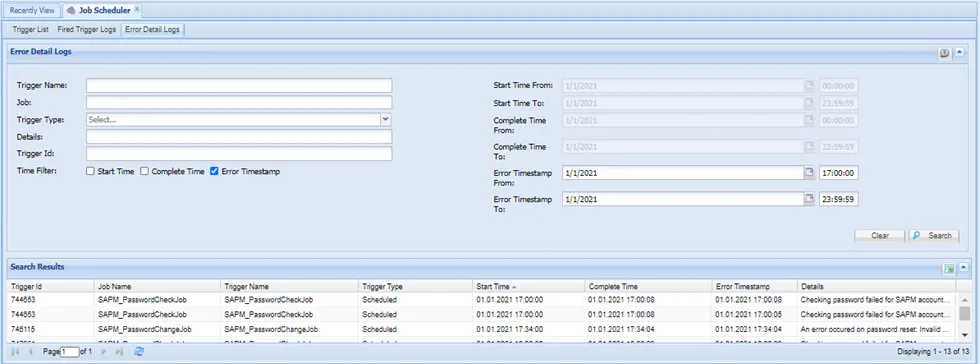
Error Detail Logs