Adding a New Tenant
The system administrator can add a new tenant:
- Click the Add button on the upper right corner
- Fill the form with the tenant details (See below for field description)
- Click the image icon.
- Locate and upload the company logo image.
- Click Edit Licenses to edit the tenant license limitations (Refer to the section Adding / Editing Tenant Licenses for more information)
- Click Save.
The new tenant will now be listed among the tenants.
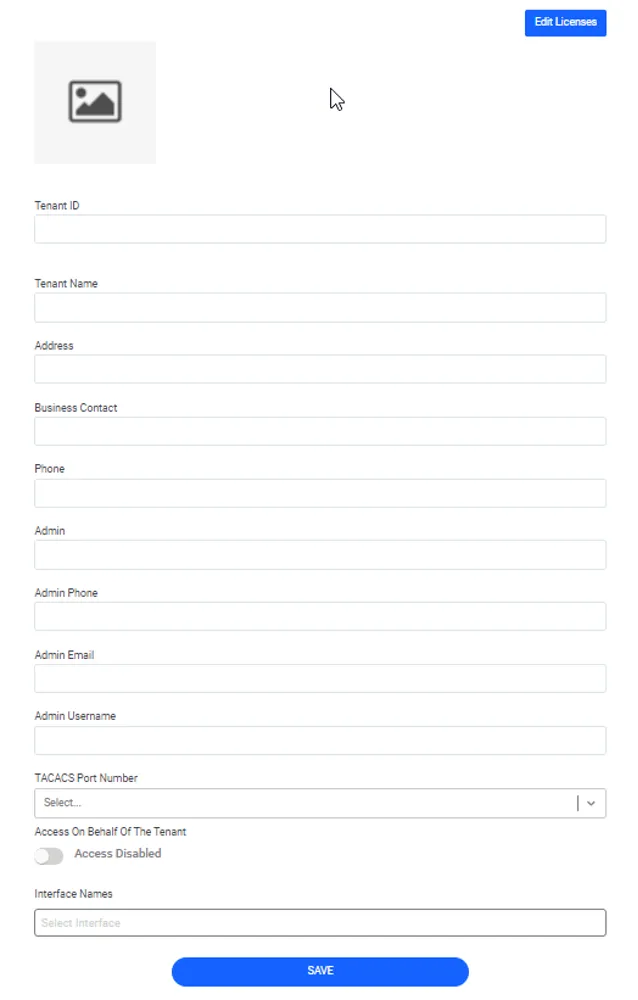
“Add New Tenant” Dialog Box
New tenant form field description:
- Tenant Id: The descriptive tenant keyword, which is used in the tenant schema name and during log-in (a tenant user should log in as “<username>@<Tenant Id>”). Only lower-case letters should be used. It cannot be changed once the tenant is created.
- Tenant Name: The name of the tenant.
- Address: The tenant’s street address.
- Business Contact: The name of the business contact for the tenant.
- Phone: The phone number of the business contact for the tenant.
- Admin: The main administrator for the tenant.
- Admin Phone: The phone number of the main administrator for the tenant.
- Admin Email: The email address of the main administrator for the tenant. An email with the password setup link is sent after the new tenant is created.
- Admin Username: The unique username for the main tenant administrator. This user is created along with the tenant schema becomes the first user of the new tenant, and has access to all administration modules. This user can share these duties with other tenant users once they are added to the tenant schema.
- TACACS Port Number: The port number that the TACACS devices in the tenant schema will use for the TACACS protocol. The alternative values that appear in this combo box are defined by the multitenancy.tacacs.port.range parameter in the System Config. Man. interface.
- Access on Behalf of the Tenant: When it is enabled, the host employees can have access to the tenant interface and make changes on their behalf.
- Interface Names: The VRF interfaces that can be used by the tenants.