Create Assets in Orchestrator
2 min
Now that the credential store is set up, you need to create Assets that reference secrets stored in Kron PAM.
Step 1: Go to the Assets Section
- Navigate to the Assets tab in Orchestrator.
- Click + Add asset to create a new asset.
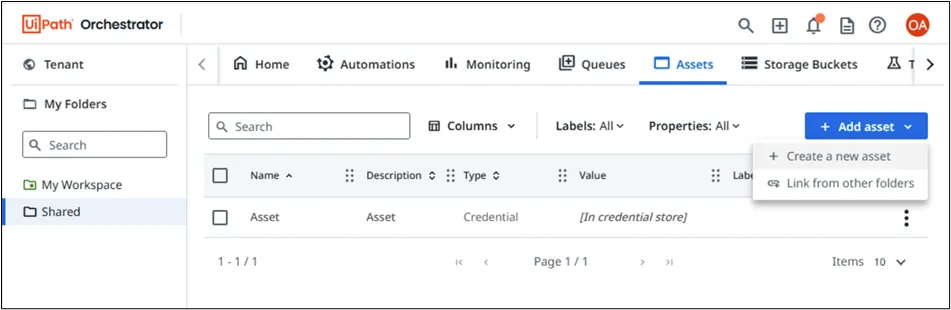
UiPath Assets
Step 2: Define Asset Linked to Kron PAM
In the Add Asset form:
- Asset Name: A logical name like Domain Admin.
- Type: Choose Text (or Credential, depending on usage).
- Description: e.g., Domain Admin Account
- Value (Text): Enter the Vault Account Identifier from Kron PAM. Enter the account reference in the format: account_name@account_full_path (Example: Administrator@/WindowsDomainAccounts)
The value entered here must match the vault account exactly as registered in Kron PAM.
Click Create to save.
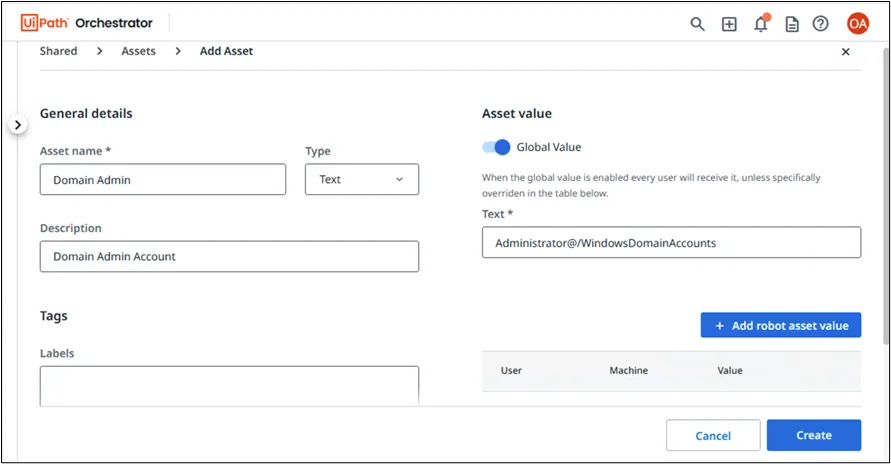
Add Asset