AAPM Agent Installation in Linux Environments
The AAPM Agent installation package must be downloaded from the Kron Repository and transferred to the target Linux environment where the agent will operate. The repository also contains SDK files, which are required for integration but do not need to be installed on the same host as the agent. Additional details on using the SDKs are provided in Kron PAM AAPM SDK Guide.
Installation Overview
The installation process is automated through a setup script that manages all necessary steps. This script includes:
- install.jar – The main installation package that performs the deployment.
- silent-install.properties – A configuration file that defines the installation parameters.
The AAPM Agent is a Java-based application and requires OpenJDK 8 or later to run.
Silent Installation Properties File
The silent-install.properties file contains key configuration parameters that must be customized before running the installation script. The parameters and description information in the configuration file are provided in the table below.
Parameter | Description |
|---|---|
INSTALL_PATH | Target directory where the agent will be installed (default installation path is "/opt/KronPAM/") |
sc.primaryIp | IP Address of Kron PAM's Primary Node |
sc.secondaryIp | IP Address of Kron PAM's Secondary Node |
sc.initialToken | Registration token required during the initial installation. |
sc.agentName | Name assigned to the AAPM Agent instance. |
sc.ssl.ignored | Ignores Kron PAM SSL certificate errors (true/false) |
sc.hostname.ignored | Ignores hostname verification of the Kron PAM environment |
sc.verified.hostname | Enforces hostname verification of the Kron PAM |
security.enabled | Enables AAPM Agent certificate validation |
security.cert | CA-signed or Self-Signed certificate's path (.jks) ("kron-agent" user must have access to the file and must have read permission) |
security.password | CA-signed or Self-Signed certificate's keystore password |
grpc.port.loc | gRPC port number to be used for communication between the agent and SDKs. |
Agent | Includes AAPM Agent installation (default value=1) |
SDK | Includes Kron PAM AAPM SDKs to installation |
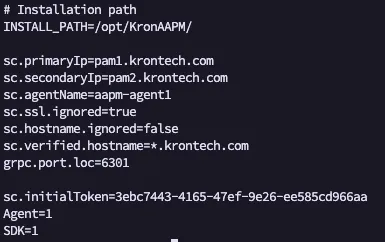
Silent Install
To perform a silent installation, place both the install.jar file and the silent-install.properties file in the same directory. Before proceeding, verify that all required installation parameters are correctly specified within the silent-install.properties file. Once configured, execute the install.jar file to initiate the installation process.
java -jar install.jar -console -defaults-file silent-install.properties -autoThe install_aapm_agent.sh script automatically:
- Creates the necessary service definitions.
- Configures agent user and permissions.
- Starts the AAPM Agent service upon successful installation.
AAPM Agent Application Properties
The parameters in the application.properties file located in the AAPM Agent installation folder can be changed after installation if needed. Changing these parameters requires a restart.
Parameter Name | Description |
|---|---|
grpc.port | gRPC port number to be used for communication between the agent and SDKs. |
singleconnect.address | IP Address/Hostname of Kron PAM's Primary Node |
singleconnect.failoverAddress | IP Address/Hostname of Kron PAM's Secondary Node |
singleconnect.agentName | Name assigned to the AAPM Agent instance |
singleconnect.ssl-ignored | Parameter to be used to ignore certificate validation errors |
singleconnect.hostname-ignored | Parameter to be used to ignore certificate hostname validation errors |
singleconnect.installToken | Registration token required during the re-registration |
app.grpc.security.protocols | SSL version to be used (comma seperated. E.g. TLSv1.2,TLSv1.3) |
app.grpc.security.ciphers | SSL ciphers to be used (comma seperated. E.g. TLS_ECDHE_RSA_WITH_AES_256_GCM_SHA384,TLS_ECDHE_RSA_WITH_AES_128_GCM_SHA256) |
app.grpc.security.enabled | Enables gRPC over SSL |
app.grpc.security.dist.cert-chain | CA-signed or Self-Signed certificate's path (.jks) ("kron-agent" user must have access to the file and must have read permission) |
app.grpc.security.keystore-password | CA-signed or Self-Signed certificate's keystore password |
AAPM Agent Cache Parameters
The parameters related to the AAPM Agent cache can be configured in the application.properties file after installation.
Parameter Name | Description |
|---|---|
password.statusCheck.period.regular | Defines how frequently the AAPM Agent verifies the password statuses of cached accounts by querying Kron PAM |
password.statusCheck.period.intensive | Specifies an accelerated polling interval used to verify the password status of cached accounts against Kron PAM. As the password nears its expiration date, the system increases the frequency of status checks to ensure timely detection and synchronization. |
password.statusCheck.period.bufferInSeconds | Defines an additional buffer interval applied during password rotation for cached accounts. The buffer duration is determined by the execution status of the password change job in Kron PAM, ensuring sufficient time for successful completion and synchronization before subsequent actions are triggered. |
password.statusCheck.period.graceInMinutes | This parameter refers to the extended cache time that takes effect when the AAPM Agent cannot reach either of the redundant Kron PAM addresses. When the Kron PAM servers cannot be reached, the password is stored in the AAPM Agent's cache for this extended cache time. If the password request time exceeds this period, this parameter is discarded for that password. |
Managing the AAPM Agent Service
After installation, the AAPM Agent runs as a system service. To verify the service status, use:
sudo systemctl status kron-aapm-agent.service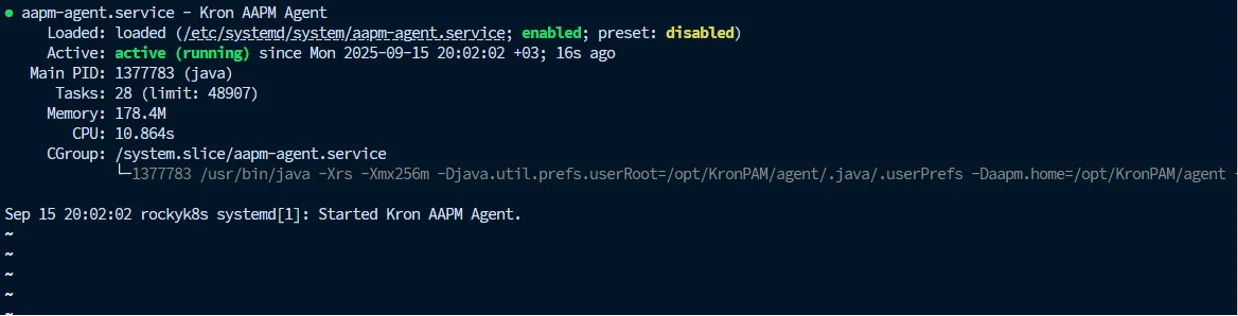
Viewing Logs
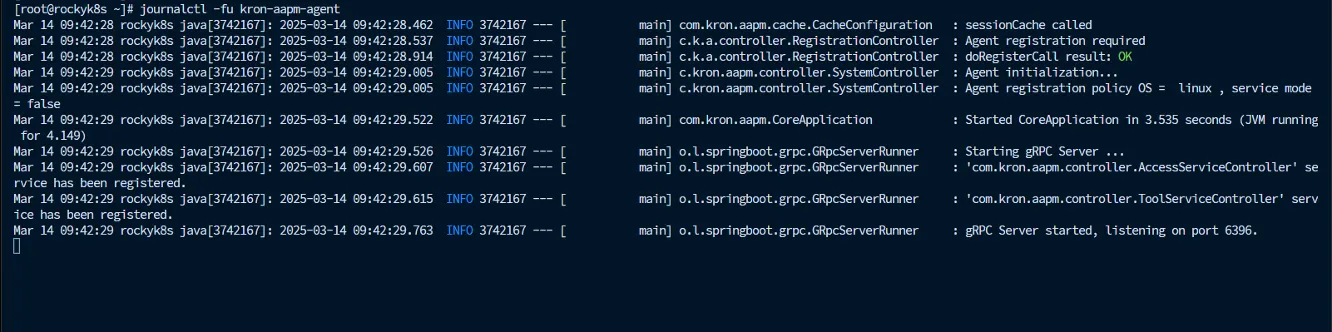
Agent runtime logs can be monitored using the journalctl command:
sudo journalctl -fu kron-aapm-agent.serviceThis command provides a live feed of the AAPM Agent’s logs for troubleshooting and monitoring purposes.
Note:Ensure that all commands are executed with appropriate privileges (e.g., root or sudo) and that network connectivity is available between the AAPM Agent and Kron PAM Nodes.
Uninstallation Procedure
To remove the AAPM Agent and all related files, follow the steps below:
- Stop agent service
sudo systemctl status kron-aapm-agent.service- Delete AAPM Agent files from installation path (The following command is an example. Please delete the relevant installation folder)
sudo rm -rf /opt/KronPAM/*- Delete AAPM Agent configuration files
sudo rm -rf /etc/kron-agent/*