Uninstallation of Agent
Before uninstalling the agent—either via the Control Panel of Windows OS or by running the uninstallation script located at C:\Program Files\Kron\KronUninstall.exe—the Kron EPM agent service must be stopped by a user who has local administrator rights.
Uninstallation should only proceed after the service has been stopped. Otherwise, the process may fail or even crash.
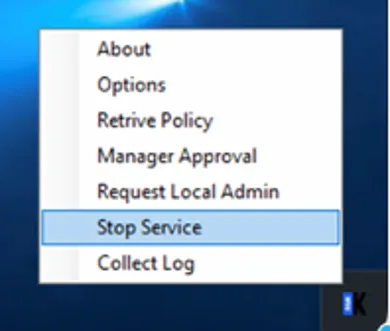
To stop the agent service, users must use the "Stop Service" functionality over Tray app. Without this, the service cannot be stopped manually.
When the "Stop Service" option is clicked, the OTP (One-Time Password) of a PAM administrator will be requested. If the correct OTP is provided, the Kron EPM agent service will be stopped successfully. Otherwise, the operation will fail.
Once the service has been stopped, the agent can be uninstalled by a user with local administrator privileges.
Even if you have local admin rights, Agent Related services are automatically restarted by the Kron EPM agent service if it is terminated for any reason.