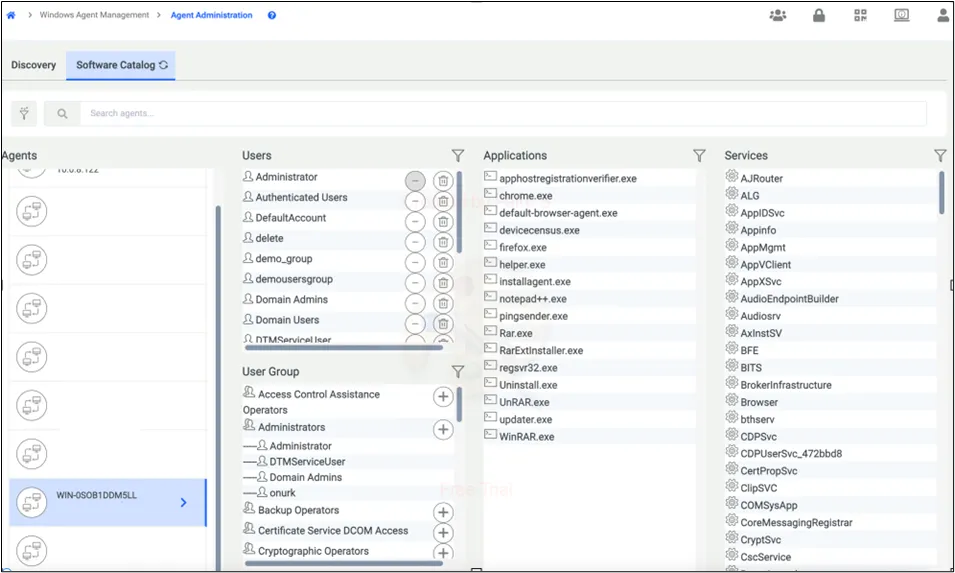
Software Catalog
When the discovery job is executed, the corresponding data and its metadata are sent to Kron PAM. Those data are Windows services, applications, and installed applications. On the other hand, without discovery, your job users and user groups are being sent to Kron PAM.
On the Software Catalog screen, under the Agent Administration page, we can observe the aforementioned data on an agent basis.
This reporting process occurs every 10 minutes for users and user groups, with no need for any configuration on the Kron PAM side.
In the User and User Group section, various user operations can be performed, such as:
- Adding or removing an AD user or local user to/from built-in user groups on Windows.
- Deleting a local user or an AD user on Windows
In the User section, clicking the Remove (illustrated with a minus Icon)button will remove the selected user, unless the user is a member of a built-in group.
In the User section, clicking the Delete (illustrated with a Trash Icon) button will delete the user from the selected endpoint.
In the User Group section, clicking the plus button allows you to add or remove AD user(s) from the group.