Creating Policy Groups
1 min
To create a Policy Group:
- Log in to the Kron PAM GUI.
- Navigate to Policy.
- Click the Add button for the Policy Group tab.
- Enter the Policy Group name and select the policy/policies and Agent Profiles.
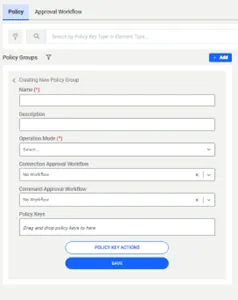
Table 5 | Operation Mode Field Description |
|---|---|
Operation Mode | Definition |
Operation | The policy group is available when devices are in operation mode (out of maintenance mode) |
Maintenance | Policy groups are available when devices are in maintenance mode. Maintenance mode is set on devices. |