Remote Privileged Access Management and Multi Tenant Connector Installation Guide
- Abbreviations
Table 1. Terms and Abbreviations | |
|---|---|
Term | Abbr. |
Remote Privileged Access Management | RPAM |
Multi Tenant Connector (also referred to as Tenant Connector) | MTC |
Privileged Access Management | PAM |
Virtual Private Network | VPN |
Graphical User Interface | GUI |
This document outlines the steps for deploying the Kron PAM Remote Privileged Access Management (RPAM) and Kron PAM Multi Tenant Connector (MTC) functionalities with the web-based RPAM MTC Installer introduced with Kron PAM 3.9.0.
Up to Kron PAM 3.8.x, RPAM and MTC were installed with separate command-line installation scripts (configure.sh) and described in two separate guides. Starting with Kron PAM 3.9.0, a single installation package (rpam-mtc) and a browser-based, step-by-step installation wizard are used to configure a server in one of the RPAM or MTC roles. This guide therefore covers both modules.
- Remote Privileged Access Management (RPAM)
Kron PAM Remote Privileged Access Management is a VPN-less, agentless, and SaaS-based solution, offering a modern approach to secure remote access while reducing compatibility issues and enhancing overall security.
By employing Kron PAM Remote Privileged Access Management, administrators can configure the working hours of 3rd party external users, manage access, and ensure seamless integration with the Kron PAM Server. 3rd party external users authenticate using a unique URL and passcode, followed by their Kron PAM credentials, ensuring a multi-layered security approach.
In order to employ Kron PAM Remote Privileged Access Management, one of the two installation scenarios (with the RPAM Connector or without the RPAM Connector) can be applied, depending on the customer's choice:
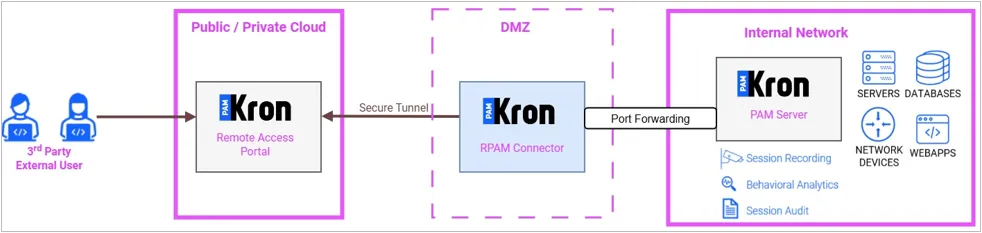
1. In the first installation scenario, where the RPAM Connector is used, two machines are set up to operate the RPAM Portal and the RPAM Connector respectively. A secure WireGuard tunnel established between the RPAM Portal and the RPAM Connector eliminates the need for traditional VPNs, enhancing security and reducing compatibility challenges while ensuring secure data transmission.
· The RPAM Portal acts as a web-based portal for vendor access, enabling secure management of internal network devices during pre-defined working hours.
· The RPAM Connector runs in the customer's own site, connects to the RPAM Portal over the WireGuard tunnel, and forwards the incoming traffic to the local Kron PAM Server.
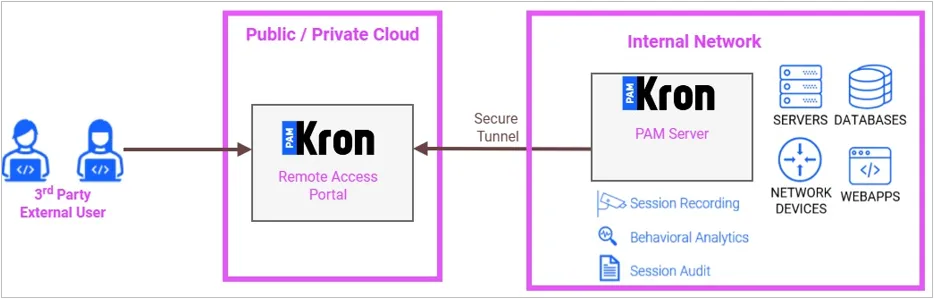
2. In the second installation scenario, where the RPAM Connector is not used (On-PAM), only one machine is set up to operate the RPAM Portal, and the WireGuard client runs directly on the Kron PAM Server itself.
· The RPAM Portal acts as a web-based portal for vendor access, enabling secure management of internal network devices during pre-defined working hours.
· The Kron PAM Server establishes the WireGuard tunnel towards the RPAM Portal and exchanges public keys with it.
- Multi Tenant Connector (MTC)
Even though the product name is Multi Tenant Connector, the Multitenancy license is not required. Initially, the product was tailored for multi-tenant environments, but currently, non-multi-tenant environments can also use the Multi Tenant Connector.
Moreover, the Multi Tenant Connector product might also be called Tenant Connector interchangeably.
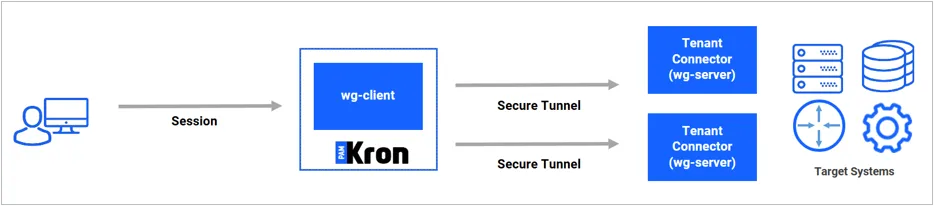
The Multi Tenant Connector is a lightweight component deployed within the customer's (or tenant's) remote environment, responsible for securely bridging Kron PAM with target resources that are not directly accessible. Communication between Kron PAM and the Multi Tenant Connector is established over a WireGuard-based encrypted tunnel, ensuring the confidentiality and integrity of all session traffic.
The Multi Tenant Connector acts as a controlled access proxy. When a target device is marked as "connector-accessible" within the Kron PAM Web GUI, Kron PAM dynamically provisions port-based forwarding rules on the connector. These rules are implemented using iptables at the operating system level.
Specifically, Kron PAM assigns a unique virtual port (starting from 40000 and incrementing sequentially, e.g., 40001, 40002) for each mapped target resource. Incoming traffic from Kron PAM over the WireGuard tunnel to these virtual ports is transparently forwarded by the Multi Tenant Connector to the corresponding internal device IP and service port.
For both Outbound and Inbound Built-in VPN Multi Tenant Connector (MTC), the CONNECTOR_BUILTIN_VPN license should be active on the Kron PAM Server.
The MTC is completely independent of the RPAM Connector and RPAM Portal. There are two options for MTC deployment:
· Outbound Built-in VPN: The outbound connection refers to the path that begins at the Kron PAM Server and ends at the Multi Tenant Connector, i.e., the tunnel connection is initiated by Kron PAM. The Kron PAM Server acts as the WireGuard client (its tunnel configuration contains the Endpoint of the connector), and the Multi Tenant Connector acts as the WireGuard server (it listens on the tunnel port).
· Inbound Built-in VPN: The inbound connection refers to the path that begins at the Multi Tenant Connector and ends at the Kron PAM Server, i.e., the tunnel connection is initiated by the connector. The Multi Tenant Connector acts as the WireGuard client (its tunnel configuration contains the Endpoint of the Kron PAM Server, i.e., the External IP), and the Kron PAM Server acts as the WireGuard server (it listens on the tunnel port).

- The RPAM MTC Installer
The RPAM MTC Installer is a browser-based, step-by-step wizard used to configure a server in one of the following four roles:
Role | Description |
|---|---|
RPAM Connector | Runs in the customer's own site. It connects to the RPAM Portal over a WireGuard tunnel and forwards the traffic coming from the portal to the local Kron PAM Server. (Shown as "On-Prem Connector" on some installer screens.) |
RPAM Portal | The cloud-side access point of Kron PAM: WireGuard server + nginx + RPAM Portal application. |
MTC | Multi Tenant Connector, the tenant connection feature of Kron PAM. It is installed either as Outbound (Kron PAM initiates the connection) or Inbound (the connector initiates the connection). |
On-PAM | Runs the WireGuard client directly on the Kron PAM Server itself, without using an RPAM Connector. |
The installation is started by browsing to http://<server-ip>:8443 from a web browser after the installer service has been started on the target server (see Section 4.2).
One host is configured for one role. If a host is reconfigured for a different role, the services and interfaces of the previous role are not cleaned up automatically (see Troubleshooting).