Connecting with the Kron DAM SQL Proxy
There are different kinds of SQLs supported by Kron DAM. The port number is the identifier of the connection to the Database via Kron DAM SQL Proxy. To establish a connection using SQL Proxy:
- Utilize an SQL client (such as DBeaver, DataGrip, SQL Workbench, etc.)
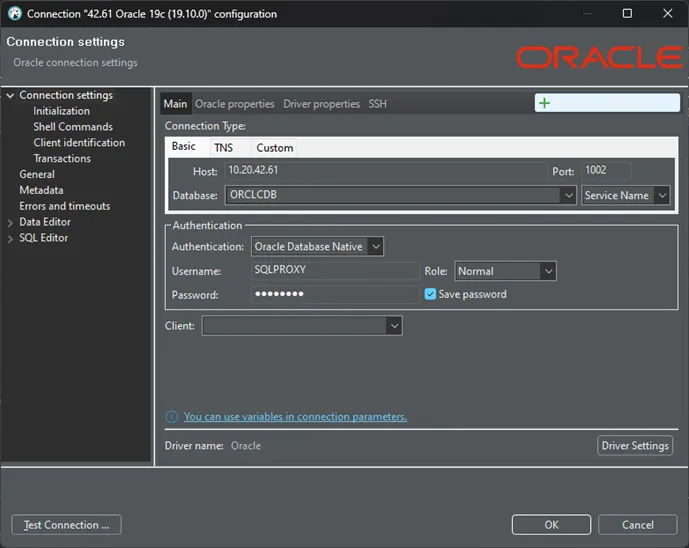
- Initiate a new connection in the SQL client, selecting the type of database added to Kron DAM (e.g., if Oracle was added to Kron DAM, select an Oracle-type connection).
- Enter the username and password for the device you entered in Kron PAM into the connection screen of your SQL client.
- Enter the SQL proxy port number, specifically assigned in Kron DAM, into the Port field.
- Input the IP number of Kron DAM into the Host field.
- Enter the database name you entered in Kron DAM into the Service Name field.
- Establish the connection.
For MSSQL DB Connections some SQL Clients could give connection errors. To solve this please change the sslProtocol to TLSv1.2
To allow Oracle database connections via TOAD, the lock.procedural.sensitive.queries=false parameter must be defined in the system configuration.
Even if the connection parameters are correctly configured, metadata retrieval may fail due to timeout in some cases. This is typically caused by slow response from the target database. If necessary, the dam.ddm.metadata.connection.timeout parameter can be increased to extend the timeout duration.