Download and Install Patches
This section describes how to download and install patches.
Patch Installation
Prerequisites
Download the Kron PAM patch package before starting the installation procedure and check md5sum. Kron PAM installation packages are uploaded to filerepo.krontech.com SFTP Server. The Krontech support team provides credentials and patch filename.
Also, note the following:
- The following installation procedure restarts Kron PAM components automatically.
- You must execute the installation procedure with root privilege.
Installing the Patch
After downloading the upgrade package from filerepo.krontech.com and checking md5sum:
- Extract the Kron PAM Upgrade Package by using the following command: [root@localhost Downloads]# tar xvf patch_xxx.tgz
- List extracted files. [root@localhost Downloads]# ls -ltr -rwxr-xr-x. 1 polkitd polkitd 22264 Apr 23 23:54 update.sh drwxr-xr-x. 2 polkitd polkitd 67 Apr 24 00:13 update
- Execute the update.sh script. The patch script checks the current status of components and the current version of Kron PAM, prompts available updates, and displays three installation options.
- [root@localhost Downloads]# ./update.sh
Select the correct option (see the following table), and then press Enter.
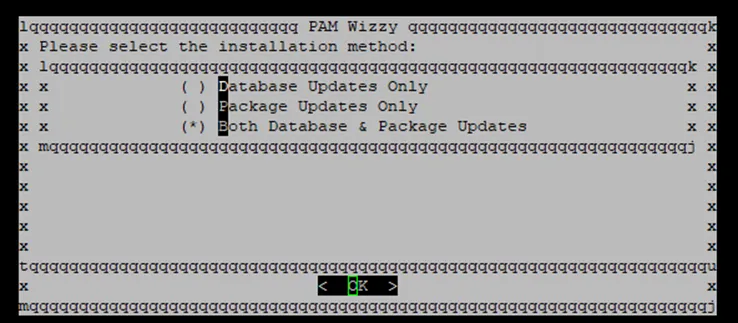
Both Database&Package Updates | Applies all packages and database changes. This option can be installed on all nodes involved in the replication. |
|---|---|
Package Updates Only | Applies only to package changes. Select this option to install the patch on a node. |
Database Updates Only | Applies only to database changes. Select this option only to apply database changes |
After selecting the correct option, the patch will be executed straight forward. Patch automatically restarts the Kron PAM components and database to apply changes.
If the installation finishes successfully, no errors will be displayed. When the installation finishes, execute the health check commands described in the Kron PAM Maintenance and Operation Guide.
Post Check
Open your web browser and enter the URL address of Kron PAM Web GUI. The Kron PAM portal will be loaded successfully.